PH
PHINSTRUCTIONS:
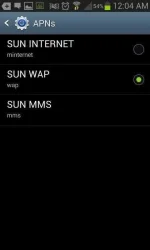
1. GO TO SETTINGS> MOBILE NETWORK > ACCESS POINT
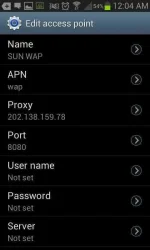
CREATE an APN:
APN name: SUN WAP
APN: wap
Proxy: 202.138.159.78
Port: 8080
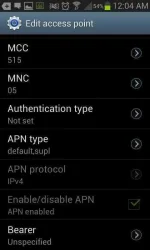
APN Type: default, supl
then SAVE and you must select SUN WAP as default access point
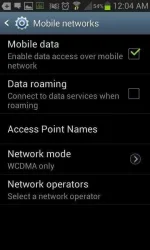
2. GO TO SETTINGS > MOBILE NETWORKS > NETWORK MODE:
Instead of choosing automatic change it to WCDMA ONLY
3. Lastly. Click Network Operators and Select SUN 3G not the SUN CELLULAR 3G.
Then ON your mobile data.
BE SURE YUNG SA SIGNAL NYU KATABI NYAN AY H+ or 3G so meaning to say okay yung SETUP mo.
Pag katabi ng Signal Icon mo ay R meaning mali need mo change network operator mo.
TADA! ENJOY
100% WORKING
Be sure to have a good signal.
Thats it don't Forget to give Feedbacks and Thanks.
I PROVIDED PICTURES BELOW in attachments.
NOTE: I COULD FACEBOOK, DOWNLOAD MUSIC, UPLOAD PHOTOS AND ALSO I COULD ALSO USE PLAY STORE.
NOTE 2: Make sure you are subscribe to any unlimited services ng sun OR mag lagay ka ng 1 peso remaining balance. yun lang
Note 3:If you are using Sun Cellular 3G tapos sa itaas ay nakalagay R ito lang dapat mong gawin para ma activate ung H+ mo Click mo ACTIVATE yung DATA ROAMING mo CHECK mo yan
thanks & Credits to JCLIKENESS
1. GO TO SETTINGS> MOBILE NETWORK > ACCESS POINT
CREATE an APN:
APN name: SUN WAP
APN: wap
Proxy: 202.138.159.78
Port: 8080
APN Type: default, supl
then SAVE and you must select SUN WAP as default access point
2. GO TO SETTINGS > MOBILE NETWORKS > NETWORK MODE:
Instead of choosing automatic change it to WCDMA ONLY
3. Lastly. Click Network Operators and Select SUN 3G not the SUN CELLULAR 3G.
Then ON your mobile data.
BE SURE YUNG SA SIGNAL NYU KATABI NYAN AY H+ or 3G so meaning to say okay yung SETUP mo.
Pag katabi ng Signal Icon mo ay R meaning mali need mo change network operator mo.
TADA! ENJOY
100% WORKING
Be sure to have a good signal.
Thats it don't Forget to give Feedbacks and Thanks.
I PROVIDED PICTURES BELOW in attachments.
NOTE: I COULD FACEBOOK, DOWNLOAD MUSIC, UPLOAD PHOTOS AND ALSO I COULD ALSO USE PLAY STORE.
NOTE 2: Make sure you are subscribe to any unlimited services ng sun OR mag lagay ka ng 1 peso remaining balance. yun lang
Note 3:If you are using Sun Cellular 3G tapos sa itaas ay nakalagay R ito lang dapat mong gawin para ma activate ung H+ mo Click mo ACTIVATE yung DATA ROAMING mo CHECK mo yan
thanks & Credits to JCLIKENESS