 PH
PH-
Welcome to PHCorner Forums! Sign up for free to unlock full access and exclusive privileges, including:
- Asking questions about computer and mobile issues
- Discovering internet tips for your mobile network and computer
You are using an out of date browser. It may not display this or other websites correctly.
You should upgrade or use an alternative browser.
You should upgrade or use an alternative browser.
🔒 Closed Pahelp naman po
- Thread starter Jmrie_
- Start date
-
- Tags
- help po ... please
- Status
- Not open for further replies.
PHC-Metanoia
Forum Expert
Try niyo raw to boss. Nahanap ko lang somewhere:
1. go to control panel
2. select "Hardware and Sound
3. Open the "Realtek HD Audio Manager"
4. Click on "Device Advance Settings" in the top right corner
5. then on PLAYBACK DEVICE tick on "Make internal and
external output devices playback two diff. audio streams
simultaneously" then press OK
1. go to control panel
2. select "Hardware and Sound
3. Open the "Realtek HD Audio Manager"
4. Click on "Device Advance Settings" in the top right corner
5. then on PLAYBACK DEVICE tick on "Make internal and
external output devices playback two diff. audio streams
simultaneously" then press OK
Funyarinpa
Forum Guru
disable mo na lang ts yung laptop speaker as an alternative...
Sige try ko ito if di parin gumana dalhin ko na ito sa mall hays hirap pag bagohan langdisable mo na lang ts yung laptop speaker as an alternative...
Try ko ito mamayaTry niyo raw to boss. Nahanap ko lang somewhere:
1. go to control panel
2. select "Hardware and Sound
3. Open the "Realtek HD Audio Manager"
4. Click on "Device Advance Settings" in the top right corner
5. then on PLAYBACK DEVICE tick on "Make internal and
external output devices playback two diff. audio streams
simultaneously" then press OK
SpectaculairE
Forum Guru
Meron pa din pala dito hehehe
try mo to:
right click on the sound icon and choose playback devices. You should see both laptop speakers and headphones, high light headphone and click on Make Default. It should toggle back to speakers as default when you remove the headphones.
try mo to:
right click on the sound icon and choose playback devices. You should see both laptop speakers and headphones, high light headphone and click on Make Default. It should toggle back to speakers as default when you remove the headphones.
Wala po ganyan mic lang yung lumalabas yung headset walaMeron pa din pala dito hehehe
try mo to:
right click on the sound icon and choose playback devices. You should see both laptop speakers and headphones, high light headphone and click on Make Default. It should toggle back to speakers as default when you remove the headphones.
SpectaculairE
Forum Guru
sa playback devices hindi sa recordedWala po ganyan mic lang yung lumalabas yung headset wala
Ah wala sirsa playback devices hindi sa recorded
Puyat na ako kakahanap ng solution dito ang hirapsa playback devices hindi sa recorded
SpectaculairE
Forum Guru
wait, mag ss ako, win 10 ba?Ah wala sir
Yung headset ko kasi may mic eh tsaka nakakalito gusto ko sana i system restore to kaso baka mawala yung windows kosa playback devices hindi sa recorded
Sige po ss mo pls tulongan mo gusto ko lang maayos ito naiinis ako e dalawang tunog naririnig ko ehwait, mag ss ako, win 10 ba?
SpectaculairE
Forum Guru
okay lang basta ma back up kaYung headset ko kasi may mic eh tsaka nakakalito gusto ko sana i system restore to kaso baka mawala yung windows ko
sa system restore ba back up na ba yun once na yun gawin mookay lang basta ma back up ka
Gusto ko lang maayos ito nakakainis dalawa sound naririnig ko tsaka ilang tingin na ako sa sound drive.okay lang basta ma back up ka
SpectaculairE
Forum Guru
Right click mo si Speaker Icon sa baba, click playback devices
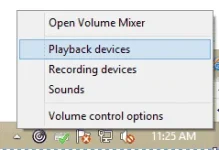
tapos bukod kay Speakers, dapat lalabas diyan yung headset mo, select mo yun tapos Set Default
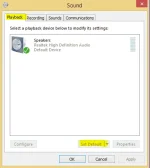
tapos bukod kay Speakers, dapat lalabas diyan yung headset mo, select mo yun tapos Set Default
Hinde po lumalabas yung headset.. sa playbackRight click mo si Speaker Icon sa baba, click playback devices
View attachment 649256
tapos bukod kay Speakers, dapat lalabas diyan yung headset mo, select mo yun tapos Set Default
View attachment 649257
SpectaculairE
Forum Guru
teka, ibang usapan na yan,Hinde po lumalabas yung headset.. sa playback
may tama yata ang headset mo, nakasaksak bang mabuti yan? bago ba ayan? na-try mo na ibang headset?
RyzenV FreeAllYouCan-OFFICIAL help hehehe
Kakabili lang po neto alam niyo ba lahat ng earphones ko ganun din ang issue balak ko na nga mag linux e maarte ang windowsteka, ibang usapan na yan,
may tama yata ang headset mo, nakasaksak bang mabuti yan? bago ba ayan? na-try mo na ibang headset?
RyzenV FreeAllYouCan-OFFICIAL help hehehe
- Status
- Not open for further replies.
Similar threads
-
-
❓ Help Sino po marunong manghäçk ng fb account dito? pahelp naman po, willing to pay.
- Started by Green_Apple
- Replies: 0
-
MOVIE UNDER 200MB LOW QUALITY NA PWDE E DOWNLOD SAN KAYA? BAKA MERON KAYO ALAM GUYS. PAHELP NAMAN
- Started by idrishoo
- Replies: 8
-
About this Thread
-
78Replies
-
2KViews
-
7Participants
Last reply from:
Jmrie_
Jmrie_
New Topics
-
Screen Flickering Issue
- Started by chenez68
- Replies: 2
- ❓ Computer Discussion & Support
-
LF rent po TSM or unlock tool
- Started by Z3N0
- Replies: 0
- ❓ Computer Discussion & Support
-
Suggest laptop 30-33k budget
- Started by PHC_Shion
- Replies: 0
- ❓ Computer Discussion & Support
-
Using Codex CLI for Coding Efficiently
- Started by missterry
- Replies: 2
- ❓ Computer Discussion & Support
-
Pasabit Autocad Invites
- Started by Kryptonite18
- Replies: 0
- ❓ Computer Discussion & Support
-
FB ban and cant create new
- Started by VedfacR
- Replies: 3
- ❓ Computer Discussion & Support
-
Suggest VA job websitrs na legit
- Started by mitchmp
- Replies: 1
- ❓ Computer Discussion & Support
-
Calculator Emulator (Canon F789SGA I or II)
- Started by DDankii
- Replies: 0
- ❓ Computer Discussion & Support
-
Laptop Price for 2027
- Started by sisig with egg
- Replies: 2
- ❓ Computer Discussion & Support
-
Is this graphic card issue?
- Started by markjson
- Replies: 2
- ❓ Computer Discussion & Support
Trending Topics
Online now
- Members online
- 1,144
- Guests online
- 5,189
- Total visitors
- 6,333