PH
PHAnotherWays
Honorary Poster
Hi Guys, this trick will help you get rid of wasting time in buffering, Specially those who has slow internet connection.
INSTRUCTION:
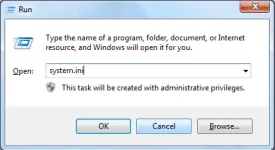
1.Press Windows Button + r on your keyboard.
then type this "system.ini" without the quotes.
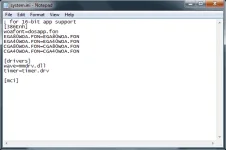
2. A new notepad windows will appear which will look like this.

3. Copy and paste the code below at the bottom of the notepad.
CODE:
page buffer=1000000Tbps
load=1000000Tbps
Download=1000000Tbps
save=1000000Tbpsback=1000000Tbps
search=1000000Tbps
sound=1000000Tbps
webcam=1000000Tbps
voice=1000000Tbps
faxmodemfast=1000000Tbps
update=1000000Tbps
IT SHOULD LOOK LIKE THIS
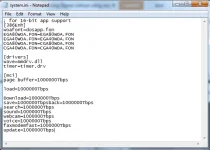
4. Now save the notepad by clicking file then save. or simply press CTRL + S on your keyboard. Don't forget to Restart you PC so the changes will take effect.
NOTE: To those who got an error when saving the system.ini file. just download and install this You do not have permission to view the full content of this post. Log in or register now.. Then go to drive C:>Windows and look for the system.ini file then right click on it and select "Take Ownership", then try to save the system.ini file again.
HAVE FUN EVERYONE!
DONT FORGET TO SHARE TO YOUR FRIENDS!
THANK YOU!
INSTRUCTION:
1.Press Windows Button + r on your keyboard.
then type this "system.ini" without the quotes.
2. A new notepad windows will appear which will look like this.
3. Copy and paste the code below at the bottom of the notepad.
CODE:
page buffer=1000000Tbps
load=1000000Tbps
Download=1000000Tbps
save=1000000Tbpsback=1000000Tbps
search=1000000Tbps
sound=1000000Tbps
webcam=1000000Tbps
voice=1000000Tbps
faxmodemfast=1000000Tbps
update=1000000Tbps
IT SHOULD LOOK LIKE THIS
4. Now save the notepad by clicking file then save. or simply press CTRL + S on your keyboard. Don't forget to Restart you PC so the changes will take effect.
NOTE: To those who got an error when saving the system.ini file. just download and install this You do not have permission to view the full content of this post. Log in or register now.. Then go to drive C:>Windows and look for the system.ini file then right click on it and select "Take Ownership", then try to save the system.ini file again.
HAVE FUN EVERYONE!
DONT FORGET TO SHARE TO YOUR FRIENDS!
THANK YOU!