PH
PHshare ko lang mga kaPH
Likes and Feedback din para malaman kung work
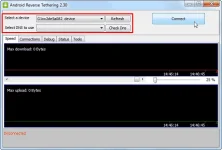
a usb reverse tethering this post is all about a tutorial that can share your pc’s internet connection on your android phone through usb connection, first you need to have your android phone root access, then the windows software called Android Reverse Tethering tool - is a free windows utility which makes use of ADB ( Android debug bridge ) to share your Computer’s internet connection with your android phone over an USB data cable .
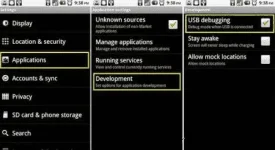
Step 1: Connect your Android phone on your PC using an USB cable and ensure that USB debugging is enabled on your phone . ( Settings > Applications > Development > USB Debugging > Turn On )
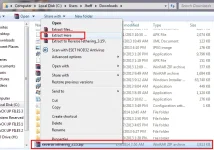
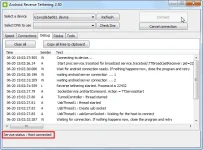
Step 2: Extract the Android Reverse Tethering Tool<--- (SEE IN THE ATTACHMENT) zip file and run the AndroidTool.exe file. (sorry for the screenshot its 2.30, the uploaded software is version 3.15)
Step 3: From the Android reverse tethering utility , select your phone from the “ Select a device “ drop down box and then from the “ Select DNS to use “ dropdown box , select a DNS ( Choose anything apart from 192.168.1.1 ) .
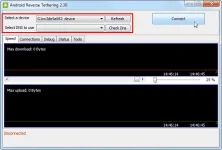
Step 4: Click on the Connect button to start the reverse tethering process. The utility will then connect with your android phone and install the required apps on your phone. If the utility crashes simply run it over again .
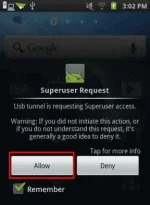
Step 5: After the required apps have been installed on your phone, You will be prompted to grant root access to the USB tunnel app . Tap on “Grant” to provide root access to the app and you can access your Computer’s internet connection on your phone.
Thats it and now you will be able to access your Computer’s internet on your Android phone and even all your android apps would be able to access it too . You might be prompted with an No network connection error in intervals, its nothing to worry about and you can click ok to proceed further.
Likes and Feedback din para malaman kung work
a usb reverse tethering this post is all about a tutorial that can share your pc’s internet connection on your android phone through usb connection, first you need to have your android phone root access, then the windows software called Android Reverse Tethering tool - is a free windows utility which makes use of ADB ( Android debug bridge ) to share your Computer’s internet connection with your android phone over an USB data cable .
Step 1: Connect your Android phone on your PC using an USB cable and ensure that USB debugging is enabled on your phone . ( Settings > Applications > Development > USB Debugging > Turn On )
Step 2: Extract the Android Reverse Tethering Tool<--- (SEE IN THE ATTACHMENT) zip file and run the AndroidTool.exe file. (sorry for the screenshot its 2.30, the uploaded software is version 3.15)
Step 3: From the Android reverse tethering utility , select your phone from the “ Select a device “ drop down box and then from the “ Select DNS to use “ dropdown box , select a DNS ( Choose anything apart from 192.168.1.1 ) .
Step 4: Click on the Connect button to start the reverse tethering process. The utility will then connect with your android phone and install the required apps on your phone. If the utility crashes simply run it over again .
Step 5: After the required apps have been installed on your phone, You will be prompted to grant root access to the USB tunnel app . Tap on “Grant” to provide root access to the app and you can access your Computer’s internet connection on your phone.
Thats it and now you will be able to access your Computer’s internet on your Android phone and even all your android apps would be able to access it too . You might be prompted with an No network connection error in intervals, its nothing to worry about and you can click ok to proceed further.