 PH
PHShare ko lang mga guys
sana mag work sa inyo ito GOODLUCK
Tsaka ka nga pala UPDATED to
just post HSS Updated config ( HSS Elite JAPAN ASIA SERVER ) FOR SMARTBRO ONLY 92213 in my last tutorial about smartbro sim card, now in this update,MakoyPalaboy post in his thread October 3, 2013 Update: Hotspot Shield VPN na gamit ni Agent John Marco and i also want to help newbie out there, even i sometimes cant connect to hss, but thanks to our masters 89dufpoqidjv, Script_Kiddie, Lalabuyo, ashliah16, drwang12 and the others,
Needeed:
- Portable Hotspot Shield VPN (Adapters included) : (SEE IN THE ATTACHMENT)
- USB Broadband Stick with SMART BRO Sim Card (Tested on Polkadots Bro)
Installation:
- After downloading the Portable Hotspot Shield VPN, Extract it anywhere you want.
- Open the TAP-HSS 2.25 Adapter for x86 and x64 folder
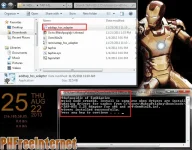
- then Right click addtap_hss_adapter and select Run as administrator"
(just wait untill it says successful)
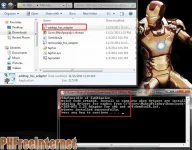
- Dashboard Setting
Connection Type = RAS
Apn: smartbro
access number: *99#
How to Connect:
- Go to your extracted file or to the HSS Folder
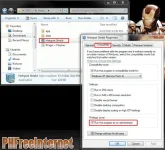
- Right Click Hotspot Shield.exe, select Properties and move to Compatibility tab.
- Follow image, Apply and OK.

- Double Click Hotspot Shield.exe
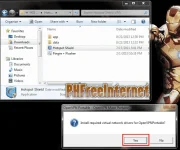
- If the Computer says something like this "Install required virtual network drivers,just click YES.
(It will install the Anchorfree HSS Adapter)
- Wait untill it will appear in the system tray
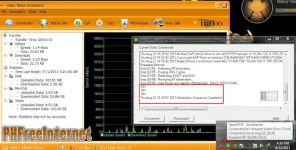
- You may Now Browse the Internet or Download any Movies you want",
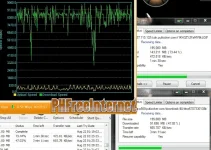
sana mag work sa inyo ito GOODLUCK
Tsaka ka nga pala UPDATED to
just post HSS Updated config ( HSS Elite JAPAN ASIA SERVER ) FOR SMARTBRO ONLY 92213 in my last tutorial about smartbro sim card, now in this update,MakoyPalaboy post in his thread October 3, 2013 Update: Hotspot Shield VPN na gamit ni Agent John Marco and i also want to help newbie out there, even i sometimes cant connect to hss, but thanks to our masters 89dufpoqidjv, Script_Kiddie, Lalabuyo, ashliah16, drwang12 and the others,
Needeed:
- Portable Hotspot Shield VPN (Adapters included) : (SEE IN THE ATTACHMENT)
- USB Broadband Stick with SMART BRO Sim Card (Tested on Polkadots Bro)
Installation:
- After downloading the Portable Hotspot Shield VPN, Extract it anywhere you want.
- Open the TAP-HSS 2.25 Adapter for x86 and x64 folder
- then Right click addtap_hss_adapter and select Run as administrator"
(just wait untill it says successful)
- Dashboard Setting
Connection Type = RAS
Apn: smartbro
access number: *99#
How to Connect:
- Go to your extracted file or to the HSS Folder
- Right Click Hotspot Shield.exe, select Properties and move to Compatibility tab.
- Follow image, Apply and OK.
- Double Click Hotspot Shield.exe
- If the Computer says something like this "Install required virtual network drivers,just click YES.
(It will install the Anchorfree HSS Adapter)
- Wait untill it will appear in the system tray
- Right-click HSS icon on system tray (the red one) then Connect to your desired server
- After that, connect Dashboard. (Make sure that you connect VPN first before dashboard so the TLS Error will not appear)
- You may Now Browse the Internet or Download any Movies you want",
 ,
,