 PH
PH- OpenVPN (ovpn) for PC and Laptop
Create ka muna ng VPN Account
Step 2
after mag create ng account, download the VPN Configs
*syempre, i edit mo muna ang config bago ilagay ang Script (payload)
Step 3
Copy mo tong payload ng OVPN (Script) [OPen mo as notepad)
Yung Remote Proxy, same lang ng HOST/IP
Spoiler contents are visible only to Established Members.
then save it..
Step 4
Test the config
simply click this icon

Right Click
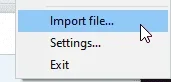
then select the config that you created..then SELECT..
then Right click this icon again,
 Select the name of your ovpn file (if isa lang naka import, Connect lang ang makikina)
then fill up the Username/Password

* Don't forget to check SAVE PASSWORD

then OK..
~~~~~~--- How to know if the OVPN is Working? -----~~~~~~~
 Working!
first. STATUS 200 Connection Established

second ASSIGN_IP blah blah blah!!

last naka green ang icon ng OVPN

 Not Working! or there's a problem
First: stock lang dito

*Troubleshoot: change Remote Proxy or Port
Second: TCP Port read failed on re rev blah blah blah

*Troubleshoot: Not working ang payload or may mali sa payload,
Change Remote Proxy rin
Last: Auth failure

*Troubleshoot: May mali sa VPN Account, Expire na VPN account,
--
Please Feedback and LIKE THIS THREAD!
⚠ Follow me for more UPDATES!!
⚠HOW TO MAKE SVL Config in SUN TU&CTC Promo
Visit this THREAD: https://phcorner.org/threads/735205/
⚠HOW TO MAKE HNH Config in SUN TU&CTC Promo
Visit this THREAD: https://phcorner.org/threads/735198/