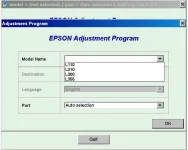
 Occasionally, some users will experience the error on their printer where it stops printing and all the lights start flashing. Different printer models may have different descriptions of this error, but it seems to be generally described as a ‘Unknown Printer Error’. In fact, numerous users in the internet community believe that this error is most often experienced when the printer has reached a condition where it thinks the ink waste pads inside the printer are full. That’s right - all that ink you lose in cleaning cycles and priming new cartridges has to go somewhere, and your Epson printer keeps track of roughly how much ink it has dumped into some large absorbent pads in the base of the printer!
Technically, this condition requires an Epson service engineer to resolve. It is however, possible that you could fix it yourself by resetting the printer and clearing the counter of how much ink has gone to those pads.
NOTE: IF YOU RESET YOUR PRINTER 7 TIMES YOU NEED TO REPLACE YOUR INK PAD OR PUT AN INK WASTE TANK AT THE BACK OF THE PRINTER OR ELSE WASTE INK WILL SPILL ON THE PAD. IN MY CASE I JUST USE THE EMPTY INK BOTTLE AS A TANK. SEE MY PIC. BELOW.
-I just found a guide how to remove L110 inkpad/absorbent pad, link below-
--------------------------------------------------------------------------------------------------------------
-------------------------------------------------------------------------------------------------------------
View attachment 26322
- for personal use only-
NOTE: Dismantling the unit will void your printer's warranty. Do it at your own risk-
===========================================================
Password to extract
===========================================================
or
Same procedure as shown on the video. Just familiarize it ^_^. good luck.
Credit to its own developer.
 PH
PH


