❓ Help Can't open/import a video on Photoshop CS6

Status
Not open for further replies.

Jerbhadz

Forum Veteran
mga boss pa help po.. di ako makapag open/import ng video sa photosop cs6..

ito lumalabas pag mag o-open ako ng video
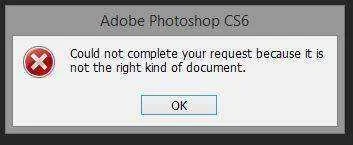
1.webp


ito naman lumalabas pag nag import ako ng video
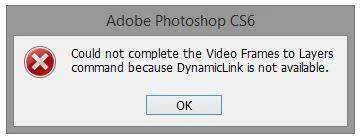
2.webp


MPEG-4/MP4 ung video..supported daw ng photoshop ung ganyang format pero ayaw naman mag open..sana po may makatulong...thanks po...

 
Hi,

I recieved and replied to your private message with the following:


If not, would you please verify the following:

0. Restart Photoshop and all Adobe applications (yeah, we have to try it), wait 30 seconds before restarting.

1. Ensure virus/security/parental control software hasn't trapped parts of Photoshop, Bridge, Premiere, Lightroom, or any Adobe app using DynamicLinkMediaServer. (Make sure the Adobe apps are added as exceptions if needed.)

2. Ensure you have the latest version of QuickTime

3. Close all Adobe applications - wait more than 30 seconds, then launch Photoshop and try to open the file.

- If unsuccessful, view Task Manager/Processes to verify necessary processes started up when importing video (dynamiclinkmanager.exe, dynamiclinkmediaserver.exe and Adobe QT32 Server.exe)

- If unsuccessful, please capture the full error message text.

4. Close all Adobe apps, wait 30 seconds - launch Bridge and try to open the file.


Did any of those resolve your issue?


Thanks,

Meredith

You do not have permission to view the full content of this post. Log in or register now.
 
Status
Not open for further replies.

About this Thread

  • 5
    Replies
  • 1K
    Views
  • 3
    Participants
Last reply from:
yus15

Trending Topics

Online now

Members online
432
Guests online
1,057
Total visitors
1,489

Forum statistics

Threads
2,272,658
Posts
28,944,472
Members
1,237,330
Latest member
watchdog11
Back
Top