🔒 Closed New Update Oppo And Realme Asus RoG Theme Open

Status
Not open for further replies.

PHC-Bhabyjay

Enthusiast
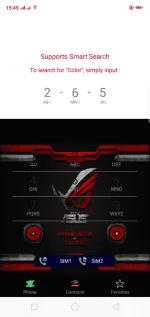
  1. You must have downloaded the theme file first and change its file extension from .apk to .theme (. theme file couldn't be downloaded directly so I changed it to .apk)
Download Here
Spoiler contents are visible only to Established Members.
  1. Got to File Manager" and look for the ColorOS folder.
  2. Open it and find the "ThemeStore" subfolder and delete it.
  3. Look for the downloaded Theme File (the one you recently downloaded)and open it.
  4. Mobirise
  5. Click on TRY NOW.
  6. Oops, we're not done yet. This is a very important step to make the theme permanent.
    1. Restart your phone for the theme features to have an effect.
    2. The apps backgrounds will be gone after restarting,so all you have to do is to repeat step 5 and 6. (NOTE: DO NOT RESTART THE PHONE AGAIN)
    3. Go back to Theme Store app and click then"ME" button below.
    4. Mobirise
    5. After clicking ME, click on My Themes (as shown in the image above).
    6. Mobirise
    7. Click on the image (as shown in the picture above) . NOTE: Click only the image, DO NOT CLICK APPLY
    8. Close the Theme Store App and wait for this pop-up.
    9. Mobirise
    10. Click on BUY NOW and click on APPLY.
    11. Pa follow nalang for more updates
    12. Feedback narin thanks ENJOY!!!!
New Update dl here
You do not have permission to view the full content of this post. Log in or register now.

Credits+Permission From Sir PHCarl
 
  1. You must have downloaded the theme file first and change its file extension from .apk to .theme (. theme file couldn't be downloaded directly so I changed it to .apk)
Download Here
  1. Got to File Manager" and look for the ColorOS folder.
  2. Open it and find the "ThemeStore" subfolder and delete it.
  3. Look for the downloaded Theme File (the one you recently downloaded)and open it.
  4. Mobirise
  5. Click on TRY NOW.
  6. Oops, we're not done yet. This is a very important step to make the theme permanent.
    1. Restart your phone for the theme features to have an effect.
    2. The apps backgrounds will be gone after restarting,so all you have to do is to repeat step 5 and 6. (NOTE: DO NOT RESTART THE PHONE AGAIN)
    3. Go back to Theme Store app and click then"ME" button below.
    4. Mobirise
    5. After clicking ME, click on My Themes (as shown in the image above).
    6. Mobirise
    7. Click on the image (as shown in the picture above) . NOTE: Click only the image, DO NOT CLICK APPLY
    8. Close the Theme Store App and wait for this pop-up.
    9. Mobirise
    10. Click on BUY NOW and click on APPLY.
    11. Pa follow nalang for more updates
    12. Feedback narin thanks ENJOY!!!!
pwd ba sa vivoy81 paps?
 
Status
Not open for further replies.

About this Thread

  • 36
    Replies
  • 7K
    Views
  • 25
    Participants
Last reply from:
Phothie23

Online now

Members online
727
Guests online
895
Total visitors
1,622

Forum statistics

Threads
2,274,613
Posts
28,957,057
Members
1,233,382
Latest member
misugami
Back
Top