PH
PH
Snagit 2019.12 (Build 3596) / TechSmith [Latest Built]
(Legit Software - & Updatable)
Snagit has long been the go-to screen capture and screen recording tool for millions of people worldwide,
allowing anyone to quickly and easily capture
and share information in easy-to-understand visual content.

How to Install ?
Step 1. I-download ang file/s:
A. Snagit_64bit.rar = kung 64 bit ang PC/Laptop mo.
(Direct download)-> You do not have permission to view the full content of this post. Log in or register now.
B. 32_Bit_Snagit_2019 = kung 32 bit ang Disktop PC mo.
(Direct download)-> You do not have permission to view the full content of this post. Log in or register now.
Step 2. Use Winrar app or an unzipping tools you prefer to unzipped the file you downloaded.
Just Right-click & "extract here".
Step 3. Right-click the snagit.exe & Run as Administrator.
Step 4. Click the "I accept the License Terms".
Step 5. Click "Option" & tick/click "Create shortcut on Desktop".

Step 6. Click "Install" & wait for the installation process to finish.
Step 7. Click "Unlock Snagit".

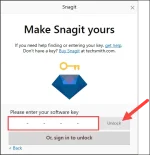
Step 8. Now, click "Enter Sofware key".
Step 9. Copy this license key & Paste it .
QK9AC-CUVVD-CPXCC-ACD7C-C2239
-----------------------------------------------------------------------------------------------------------
Bonus:
You do not have permission to view the full content of this post. Log in or register now.
How to install the stamps:
1. Donwload the Snagit stamp files & extract it using Winrar app.
2. Right-Click on each file & click open.
=========================================================================
Don't forget to Click Like