 PH
PHCredits to Pinoy()down
This free vpn requires no registration TESTED and WORKING for android device. DAPAT SMARTBRO po na sim card ang gamit nyo kasi di po ito gagana sa Smart Buddy o Talk n' Text.
Requirements:
1. Your device must be rooted. (Some reported that this is still working on unrooted devices)
2. Download the OpenVPN for Android (SEE IN THE ATTACHMENT)
3. Download the config file (SEE IN THE ATTACHMENT)
4. SMARTBRO (for users in the Philippines only)
Procedure:
1. You must have your device rooted before going any further. (Some reported that this is still working on unrooted devices)
2. Connect your android device to your pc and turn on the Mass Storage (Note: If you are doing this the first time, your PC will require you to install the necessary driver)
3. Download and install the OpenVPN for Android (click here) and copy it to your SD Card.
4. Download the config file (click here) for the premium list of servers save it to your desktop.
5. Extract the openvpn.zip (you can use winrar of winzip for extracting)
6. Copy the openvpn folder to your SD Card and disconnect your device to your PC
7. Locate the de.blinkt.openvpn.apk on your SD Card and install it.
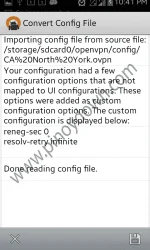
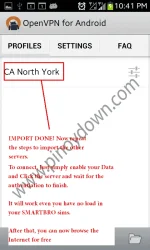
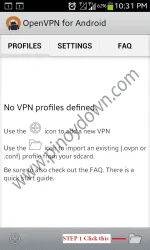
8. Now, open your recently installed OpenVPN for Android and follow the screenshots below.
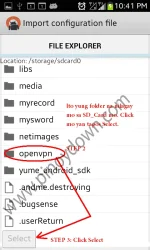
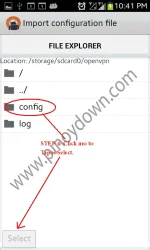
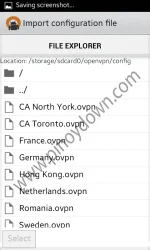
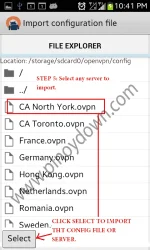
Let's start begin
This free vpn requires no registration TESTED and WORKING for android device. DAPAT SMARTBRO po na sim card ang gamit nyo kasi di po ito gagana sa Smart Buddy o Talk n' Text.
Requirements:
1. Your device must be rooted. (Some reported that this is still working on unrooted devices)
2. Download the OpenVPN for Android (SEE IN THE ATTACHMENT)
3. Download the config file (SEE IN THE ATTACHMENT)
4. SMARTBRO (for users in the Philippines only)
Procedure:
1. You must have your device rooted before going any further. (Some reported that this is still working on unrooted devices)
2. Connect your android device to your pc and turn on the Mass Storage (Note: If you are doing this the first time, your PC will require you to install the necessary driver)
3. Download and install the OpenVPN for Android (click here) and copy it to your SD Card.
4. Download the config file (click here) for the premium list of servers save it to your desktop.
5. Extract the openvpn.zip (you can use winrar of winzip for extracting)
6. Copy the openvpn folder to your SD Card and disconnect your device to your PC
7. Locate the de.blinkt.openvpn.apk on your SD Card and install it.
8. Now, open your recently installed OpenVPN for Android and follow the screenshots below.
Let's start begin
 papafollow na din pala
