 PH
PHSlasherDash
Forum Guru
New Free Internet for Globe and TM user
TESTED ON ANDROID
not tested on java, symbian and other devices
Credit po sa naka DISCOVER nito
Step by Step:
1.Register muna kayo Text
FREEGOOGLE or FREEAYOSDITO and send to 8888
kapag naka reg na proceed to next step
2.Create new Connection
APN:http.globe.com.ph
PSA: 141.0.8.143
PORT:80
then save and set nyu yung connection na ginawa nyu
3.Mag Download kayo ng Opera Mini - Modded/Unmodded
Install, after ma install goto SETTING - ADVANCE - PROTOCOL then chnge nyu yung Socket/Http to Http
4.Browse and Enjoy
NOTE:May limit po yan kung mag DDL kayo ng 20mb files pero kung Mp3 lang ang i DDL nyu ay Unlimited po yan
Download 1GB+ file
Trick for Downloading
1.Make a New Connection
APN:http.globe.com.ph
PSA:185.26.181.214
PORT:80
2.DL UC Browser 9.5 You do not have permission to view the full content of this post. Log in or register now.
Procedure:
*Open your OPERA MINI then dun kayo mag search ng gusto nyu i DL gamit ang tricks na nasa itaas
EX.
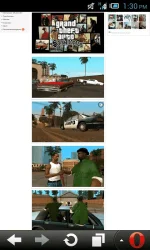
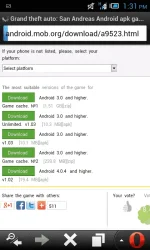
*After na ma Search ang gusto, hanapin yung gutso nyong i download
*After maka pili ng gusto i DL click download kapag may nag pop up sa opera nyu at may nakasulat na "save or cancel" choose nyu cancel then sa URL tab i COPY nyo po yung link dun (check nyo muna kung yun ang direct DL link)
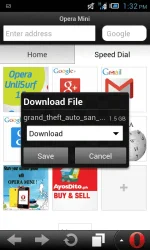
Note: Dapat ay yung gamitin nyu IP ay yung nasa DL tricks at hindi yung nasa itaas
*After na makita ang Direct DL link open UC Browser 9.5 then goto DOWNLOADS>click NEW then paste nyo dun yung na copy nyung sa "URL:" then auto detect na yan sa file name if "index.html" pa rin change nyo lang to (anyname.zip) then click Download and Enjoy!
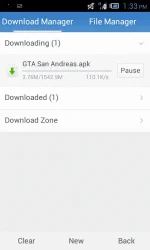
Note:Kapag nag "failed" yung gusto nyung i DL gawin nyo lang OFF/ON Mobile Data then click "Retry" then ka pag kumagat ok na yan tuloy2x na yan mag DL, If 20times Failed mag new download lang kayo then OFF&ON Mobile Data.
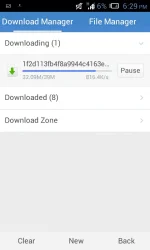
ENJOY BROWSING AND DOWNLOAD
pasensya na di ko ma up yung mga Screenshot at yung mga Apps ko, naka Mobile lang kasi ^_^
Feedback na lang guys
TESTED ON ANDROID
not tested on java, symbian and other devices
Credit po sa naka DISCOVER nito
Step by Step:
1.Register muna kayo Text
FREEGOOGLE or FREEAYOSDITO and send to 8888
kapag naka reg na proceed to next step
2.Create new Connection
APN:http.globe.com.ph
PSA: 141.0.8.143
PORT:80
then save and set nyu yung connection na ginawa nyu
3.Mag Download kayo ng Opera Mini - Modded/Unmodded
Install, after ma install goto SETTING - ADVANCE - PROTOCOL then chnge nyu yung Socket/Http to Http
4.Browse and Enjoy
NOTE:May limit po yan kung mag DDL kayo ng 20mb files pero kung Mp3 lang ang i DDL nyu ay Unlimited po yan
Download 1GB+ file
Trick for Downloading
1.Make a New Connection
APN:http.globe.com.ph
PSA:185.26.181.214
PORT:80
2.DL UC Browser 9.5 You do not have permission to view the full content of this post. Log in or register now.
Procedure:
*Open your OPERA MINI then dun kayo mag search ng gusto nyu i DL gamit ang tricks na nasa itaas
EX.
*After na ma Search ang gusto, hanapin yung gutso nyong i download
*After maka pili ng gusto i DL click download kapag may nag pop up sa opera nyu at may nakasulat na "save or cancel" choose nyu cancel then sa URL tab i COPY nyo po yung link dun (check nyo muna kung yun ang direct DL link)
Note: Dapat ay yung gamitin nyu IP ay yung nasa DL tricks at hindi yung nasa itaas
*After na makita ang Direct DL link open UC Browser 9.5 then goto DOWNLOADS>click NEW then paste nyo dun yung na copy nyung sa "URL:" then auto detect na yan sa file name if "index.html" pa rin change nyo lang to (anyname.zip) then click Download and Enjoy!
Note:Kapag nag "failed" yung gusto nyung i DL gawin nyo lang OFF/ON Mobile Data then click "Retry" then ka pag kumagat ok na yan tuloy2x na yan mag DL, If 20times Failed mag new download lang kayo then OFF&ON Mobile Data.
ENJOY BROWSING AND DOWNLOAD
pasensya na di ko ma up yung mga Screenshot at yung mga Apps ko, naka Mobile lang kasi ^_^
Feedback na lang guys
 tapos penge na rin ng SS kung meron
