 PH
PHKung wala kang load sa cp mo or tinatamad ka lang magpaload bagay sayo to 
WORKING NA WORKING
For Windows XP and UP
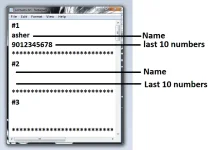
1. Open contacts.txt
2. Follow mo yung na sa baba
Upto 20 contacts can be added
Update v1.7:
Minor BUG fixes
Changes in GUI
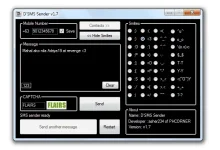
1. Wait for the sms sender to be ready
2. Input last 10 digit number
3. Input your message (minimum length 11 characters , if you want smilies click on "Smilies >>")
4. Input CAPTCHA
5. Click "Send"
6. Click "Send another message" (if you want to send a new message)
7. Click Restart(if sending takes to0 long)
Note:
This application requires internet connection to work.
Kung may gusto pa kayo ipadagdag post niyo lang dito susubukan ko ang makakaya ko
#D'SMS Sender
WORKING NA WORKING
For Windows XP and UP
Send Faster Using my new app click below:
(S.T.F.U with PHC Chatbox) Free txt to all the networks, Faster than (D'SMS Sender)
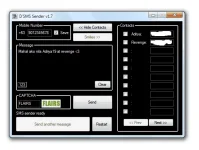
How to add contacts?(S.T.F.U with PHC Chatbox) Free txt to all the networks, Faster than (D'SMS Sender)
1. Open contacts.txt
2. Follow mo yung na sa baba
Upto 20 contacts can be added
Update v1.7:
Minor BUG fixes
Changes in GUI
How to use it:1. Wait for the sms sender to be ready
2. Input last 10 digit number
3. Input your message (minimum length 11 characters , if you want smilies click on "Smilies >>")
4. Input CAPTCHA
5. Click "Send"
6. Click "Send another message" (if you want to send a new message)
7. Click Restart(if sending takes to0 long)
Note:
This application requires internet connection to work.
Kung may gusto pa kayo ipadagdag post niyo lang dito susubukan ko ang makakaya ko
#D'SMS Sender
Send Faster Using my new app click below:
