 PH
PHNa Verify ko PAYPAL ko using PAYONEER at US BANK ACCOUNT!
Note: yung mga Link ay REFERRAL sa akin kasi may tag 25$ tayo pag ginamit niyo referral ko sure naman na MAVEVERIFIED PAYPAL NIYO
Sign Up at

What Is Payoneer? Payoneer is one of the most famous money transfer services of the world. It provides Master debit card to people throughout the world without any boundary restrictions.
So Now 1st I'll Tell You How To Sign Up For Payoneer. To Get A Payoneer Account, Follow The Instructions:
1- Click Here And This Link Will Take You To Payoneer Website And Then Click On SignUp Button. (Make Sure That You Visit Payoneer Website via Provided Link Because If You'll Signup via Provided Link Then You'll Get $25 One Time As Bonus When You'll Load $100 Or More In Your Payoneer Card.)
2- Now Fill The Required Details And Then Click On Finish. (Must Provide Your Original Details. And Your Age Should Be 1☍+). After Signup You'll Receive An Email Which You Used For Signup. (I Applied For Payoneer Card On Feb. 17 2014)
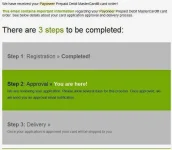
3- After Few Days You'll Receive An Email Which Title Will Be Your Payoneer Prepaid debit MasterCard card has been approved! (I Received That Email On Feb. 26 2014)
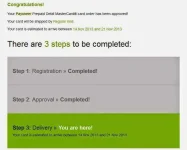
4- After Card Approval Payoneer Will Send An Emil Which Contains A Virtual US Bank Account Number And A Routing Number. This Information Is What You Need To Verify Your PayPal Account. But Your US Payment Service Will Not Be Verified And You Can't Use US Payment Service At That Time.
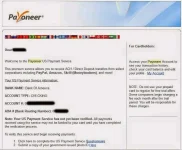
So To Verify And Start Using US Payment Service Click On Questionnaire Link Provided In Your EMail. It Will Then Ask Few Questions. These Questions Are Very Easy So It Will Not Make Any Problem. And After Submitting Question In Few Minutes Your US Payment Service Will Be Activated, Also Upload Government Issued Photo ID To Receive Payment Without Any Delay.
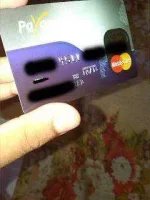
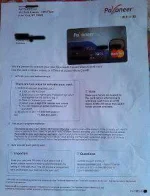
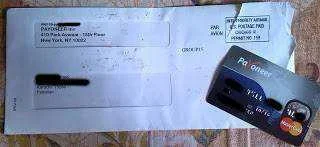
5- Now Your Payoneer Card Will Arrive Between Provided Date. May It Will Arrive Before Or After The Date Provided. After Receiving Card Login To Your Account By Visit You do not have permission to view the full content of this post. Log in or register now. And Click On Activate My Card Link And Type In Your Payoneer Debit Card Number Without Dashes And Spaces And Choose 4 Digit Pin And Then Click On Activate Card, And Then Your Card Will Be Activated. (My Card Was Estimated To Arrive Between 14 March 2014 And 21 Nov 2013 But I Received It Today On 2 April 2014.)
Now Signup for PayPal
1- Visit You do not have permission to view the full content of this post. Log in or register now. And Signup For An Account By Choosing United States As Your Country.
2- Fill In The Details Including Phone Number And Residence Address. These Details Must Be Of USA. You Can Use Fake Name Generator To Generate A US Address and Other details. Generate Details There And Then Fill Them In PayPal signup Form. But Use Your Real Name Which You Used At Payoneer For Signup.
3- Once Your PayPal Account Is Created, You Can Verify It Using Payoneer Account Details. To Verify Your PayPal Account Click On Get Verified.
4- Choose Bank Option And Fill In The Details Which Payoneer Has Sent You And To Verify Bank Click On 1st Option In Which PayPal Will Send 2 Small Deposits Less Then $1.
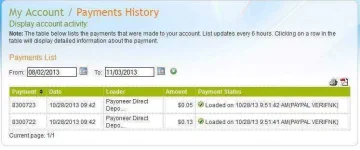
5- Within Next Few Days, PayPal Will Send A Small Test Amount To Your Payoneer Account. Put These Two Transacted Amounts In PayPal back. You Are Done! Now You Have Verified PayPal Account. (I Received That Deposits In 3 Days)
Note: You Can Also Verify PayPal Before Activating Payoneer Debit Card But Your US Payment Service Should Must Be Verified And Active. So You Can Have Verified PayPal Account Before Payoneer Debit Card Arrival.
Payoneer will send you the Mastercard which will reach you in a couple of weeks. Once the card reaches you, you can withdraw your PayPal funds using it after transferring the money to your Payoneer account.
Note: yung mga Link ay REFERRAL sa akin kasi may tag 25$ tayo pag ginamit niyo referral ko sure naman na MAVEVERIFIED PAYPAL NIYO
Sign Up at
What Is Payoneer? Payoneer is one of the most famous money transfer services of the world. It provides Master debit card to people throughout the world without any boundary restrictions.
So Now 1st I'll Tell You How To Sign Up For Payoneer. To Get A Payoneer Account, Follow The Instructions:
1- Click Here And This Link Will Take You To Payoneer Website And Then Click On SignUp Button. (Make Sure That You Visit Payoneer Website via Provided Link Because If You'll Signup via Provided Link Then You'll Get $25 One Time As Bonus When You'll Load $100 Or More In Your Payoneer Card.)
2- Now Fill The Required Details And Then Click On Finish. (Must Provide Your Original Details. And Your Age Should Be 1☍+). After Signup You'll Receive An Email Which You Used For Signup. (I Applied For Payoneer Card On Feb. 17 2014)
3- After Few Days You'll Receive An Email Which Title Will Be Your Payoneer Prepaid debit MasterCard card has been approved! (I Received That Email On Feb. 26 2014)
4- After Card Approval Payoneer Will Send An Emil Which Contains A Virtual US Bank Account Number And A Routing Number. This Information Is What You Need To Verify Your PayPal Account. But Your US Payment Service Will Not Be Verified And You Can't Use US Payment Service At That Time.
So To Verify And Start Using US Payment Service Click On Questionnaire Link Provided In Your EMail. It Will Then Ask Few Questions. These Questions Are Very Easy So It Will Not Make Any Problem. And After Submitting Question In Few Minutes Your US Payment Service Will Be Activated, Also Upload Government Issued Photo ID To Receive Payment Without Any Delay.
5- Now Your Payoneer Card Will Arrive Between Provided Date. May It Will Arrive Before Or After The Date Provided. After Receiving Card Login To Your Account By Visit You do not have permission to view the full content of this post. Log in or register now. And Click On Activate My Card Link And Type In Your Payoneer Debit Card Number Without Dashes And Spaces And Choose 4 Digit Pin And Then Click On Activate Card, And Then Your Card Will Be Activated. (My Card Was Estimated To Arrive Between 14 March 2014 And 21 Nov 2013 But I Received It Today On 2 April 2014.)
Now Signup for PayPal
1- Visit You do not have permission to view the full content of this post. Log in or register now. And Signup For An Account By Choosing United States As Your Country.
2- Fill In The Details Including Phone Number And Residence Address. These Details Must Be Of USA. You Can Use Fake Name Generator To Generate A US Address and Other details. Generate Details There And Then Fill Them In PayPal signup Form. But Use Your Real Name Which You Used At Payoneer For Signup.
3- Once Your PayPal Account Is Created, You Can Verify It Using Payoneer Account Details. To Verify Your PayPal Account Click On Get Verified.
4- Choose Bank Option And Fill In The Details Which Payoneer Has Sent You And To Verify Bank Click On 1st Option In Which PayPal Will Send 2 Small Deposits Less Then $1.
5- Within Next Few Days, PayPal Will Send A Small Test Amount To Your Payoneer Account. Put These Two Transacted Amounts In PayPal back. You Are Done! Now You Have Verified PayPal Account. (I Received That Deposits In 3 Days)
Note: You Can Also Verify PayPal Before Activating Payoneer Debit Card But Your US Payment Service Should Must Be Verified And Active. So You Can Have Verified PayPal Account Before Payoneer Debit Card Arrival.
Payoneer will send you the Mastercard which will reach you in a couple of weeks. Once the card reaches you, you can withdraw your PayPal funds using it after transferring the money to your Payoneer account.