 PH
PH[3A] Fixing a Dual Boot/Multi Boot
[a] Kung pagkarestart nyo na PC nyo ay black screen lang ang nakikita nyo. then it means na may problema ang pagboot ng PC nyo.. ( hala ka, sinira mo. ) pero its not the end of the world(or your PC)
You do not have permission to view the full content of this post. Log in or register now.
You do not have permission to view the full content of this post. Log in or register now.
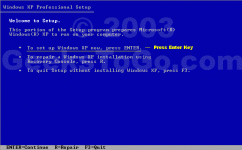
For windows 7 users, may kasama ng recovery ang installation CD nyo.
Click nyo ang startup repair. basta may repair or restore na word.

[c] Voila!! mag boot na ang OS nyo, pero bakit ganun? di ako nakapamili ng OS. di ba naginstall ako ng bagong OS?
ito ang solusyon dyan, ang easyBCD. refer to the first post for the download link. (pero sure naman akong nadownload nyo na to dahil kasama to sa tools needed)
just select add entry. add nyo yung OS na ininstall nyo.

[d] restart your PC.
SA WAKAS, NAAYOS NA ANG DUAL BOOT KO..
=====================================
[3B]Removing a Dual Boot/Multi Boot
[a] Sa inyong current OS ulit na gamit.. Buksan ulit ang computer management..
Under Storage, Choose Disk Management

[c] Right click the partition then select Format
[d] ayan wala na yung OS na ininstall nyo. pero kung mag restart kayo, lalabas parin yung entries sa boot manager.
gamitin ulit ang easyBCD para matanggal ang OS na walang laman.. delete lang ang entry.

[e] If magrestart ulit kayo, diretso na yun sa OS nyo, wala ng pagpipilian.
=====================================
AYOS WALA NA ANG MGA BOOT OPTIONS MAKAKAHINGA NA NG AYOS ANG PC KO.
[a] Kung pagkarestart nyo na PC nyo ay black screen lang ang nakikita nyo. then it means na may problema ang pagboot ng PC nyo.. ( hala ka, sinira mo.
) pero its not the end of the world(or your PC) You do not have permission to view the full content of this post. Log in or register now.
You do not have permission to view the full content of this post. Log in or register now.
For windows 7 users, may kasama ng recovery ang installation CD nyo.
Click nyo ang startup repair. basta may repair or restore na word.
[c] Voila!! mag boot na ang OS nyo, pero bakit ganun? di ako nakapamili ng OS. di ba naginstall ako ng bagong OS?
ito ang solusyon dyan, ang easyBCD. refer to the first post for the download link. (pero sure naman akong nadownload nyo na to dahil kasama to sa tools needed)
just select add entry. add nyo yung OS na ininstall nyo.
[d] restart your PC.
SA WAKAS, NAAYOS NA ANG DUAL BOOT KO..
=====================================
[3B]Removing a Dual Boot/Multi Boot
[a] Sa inyong current OS ulit na gamit.. Buksan ulit ang computer management..
Under Storage, Choose Disk Management
[c] Right click the partition then select Format
[d] ayan wala na yung OS na ininstall nyo. pero kung mag restart kayo, lalabas parin yung entries sa boot manager.
gamitin ulit ang easyBCD para matanggal ang OS na walang laman.. delete lang ang entry.
[e] If magrestart ulit kayo, diretso na yun sa OS nyo, wala ng pagpipilian.
=====================================
AYOS WALA NA ANG MGA BOOT OPTIONS MAKAKAHINGA NA NG AYOS ANG PC KO.
