 PH
PH-
Welcome to PHCorner Forums! Sign up for free to unlock full access and exclusive privileges, including:
- Asking questions about computer and mobile issues
- Discovering internet tips for your mobile network and computer
You are using an out of date browser. It may not display this or other websites correctly.
You should upgrade or use an alternative browser.
You should upgrade or use an alternative browser.
❓ Help tap windows adapter v9 network cable unplugged help..
- Status
- Not open for further replies.
pnong clear data bro? sa pc to ha. nag run ako ng proxy injector pero ung tap gnyan.clear data
Shinsuke Nishizono
Wimpy Kid
pnong clear data bro? sa pc to ha. nag run ako ng proxy injector pero ung tap gnyan.
I don't what to say, but he is clearly trolling.

In fact to answer your question or giving some recommendation, natry mo na ba maginstall ng connectify sa Laptop or Desktop with wifi enabled card?
ntry k n boss pero wla pa dn na psok n internet pag ggmitin n un wifi using phone.I don't what to say, but he is clearly trolling.
In fact to answer your question or giving some recommendation, natry mo na ba maginstall ng connectify sa Laptop or Desktop with wifi enabled card?

Shinsuke Nishizono
Wimpy Kid
Sa pagkaalam ko kasi, hindi papasok ng VPN connection through virtual wifi router by laptop. Kailangan talaga is legitimate internet.ntry k n boss pero wla pa dn na psok n internet pag ggmitin n un wifi using phone.
Although, meron siya sa Android. Pero sa PC not like that.
oo nga e gnwa ko n lhat ayaw tlga. pero meron ako nkta ggmitin un tap adapter sa proxy injector pero pag ininstall ko na sya. ayaw nmn kumonek . nklgay network cable unplugged.Sa pagkaalam ko kasi, hindi papasok ng VPN connection through virtual wifi router by laptop. Kailangan talaga is legitimate internet.
Although, meron siya sa Android. Pero sa PC not like that.
Shinsuke Nishizono
Wimpy Kid
Pero may ipapatry ako sa iyo if ever gumana sa iyo.
Punta ka sa CMD with run as admin.
Then type the following.
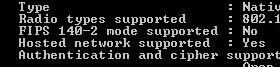
If look for your wifi card says na "Hosted network supported: YES"
Now once you see it.
Type again,
and type again
Now punta sa RUN Option. windows key plus r.
type - ncpa.cpl.
From there hanapin mo yung TAP Connection. Then right click and click on properties.
Now sa column sa taas meron doon Sharing. Select that and doublecheck the boxes. And hanapin mo yung ginawa mong virtual adapter kanina sa cmd. Then test it out.
Punta ka sa CMD with run as admin.
Then type the following.
Code:
netsh wlan show driversIf look for your wifi card says na "Hosted network supported: YES"
Now once you see it.
Type again,
Code:
netsh wlan set hostednetwork mode=allow ssid=<PANGALAN> key=<PASSWORD MO>and type again
Code:
netsh wlan start hostednetworkNow punta sa RUN Option. windows key plus r.
type - ncpa.cpl.
From there hanapin mo yung TAP Connection. Then right click and click on properties.
Now sa column sa taas meron doon Sharing. Select that and doublecheck the boxes. And hanapin mo yung ginawa mong virtual adapter kanina sa cmd. Then test it out.
Pero may ipapatry ako sa iyo if ever gumana sa iyo.
Punta ka sa CMD with run as admin.
Then type the following.
Code:netsh wlan show drivers
If look for your wifi card says na "Hosted network supported: YES"
Now once you see it.
Type again,
Code:netsh wlan set hostednetwork mode=allow ssid=<PANGALAN> key=<PASSWORD MO>
and type again
Code:netsh wlan start hostednetwork
Now punta sa RUN Option. windows key plus r.
type - ncpa.cpl.
From there hanapin mo yung TAP Connection. Then right click and click on properties.
Now sa column sa taas meron doon Sharing. Select that and doublecheck the boxes. And hanapin mo yung ginawa mong virtual adapter kanina sa cmd. Then test it out.
Attachments


Shinsuke Nishizono
Wimpy Kid
Try mo sir.TOL GMGNA NA BA TO?
no internet bro pero ty s replyTry mo sir.
- Status
- Not open for further replies.
About this Thread
-
12Replies
-
1KViews
-
2Participants
Last reply from:
CHADph
CHADph
New Topics
-
System Deployment Help
- Started by itsheshhhh
- Replies: 6
- ❓ Internet Questions
-
From s2s 799 to Bida Fiber 888 (8 user limit help)
- Started by AMDG
- Replies: 0
- ❓ Internet Questions
-
CASHG pa help po
- Started by Secret Weapon
- Replies: 0
- ❓ Internet Questions
-
PISOFI DROP SPEED
- Started by Exclamatory
- Replies: 0
- ❓ Internet Questions
-
Error code 83 on disney plus
- Started by Casio991es11
- Replies: 1
- ❓ Internet Questions
-
Pldt home fibr disconnected may pang bypass ba kayo?
- Started by boytorpe
- Replies: 1
- ❓ Internet Questions
-
Any tips or way po para mapalakas signal ng sim ko?
- Started by Meowshi
- Replies: 0
- ❓ Internet Questions
-
Sts noload/ iwanttfc
- Started by nikola budoy
- Replies: 0
- ❓ Internet Questions
-
Pa help po, internet access is blocked
- Started by sl4yer1000
- Replies: 0
- ❓ Internet Questions
Trending Topics
Online now
- Members online
- 554
- Guests online
- 4,414
- Total visitors
- 4,968