 PH
PHOpenVPN over Stunnel powered by LibreVPN
Works on SUN TU50 / TU60 / TU150
PC (Fried & Toasted medyo matagal na naming gamit to tas Hotspot nalang)
1. Download & Install OpenVPN for PC here You do not have permission to view the full content of this post. Log in or register now.
2. Download & Install Stunnel for PC here You do not have permission to view the full content of this post. Log in or register now.
Look for 32bit version here ftp://ftp.stunnel.org/stunnel/archive/5.x/
(C) to Helgafjell Crematoria
3. Create an account on LibreVPN > OpenVPN here You do not have permission to view the full content of this post. Log in or register now.
4. Download Configuration here select DIRECT CONNECTION & SSL Beta on Authentication Type You do not have permission to view the full content of this post. Log in or register now.
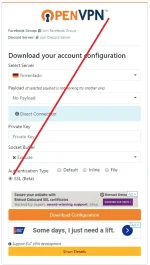 ds.html
5. Open Stunnel for PC > right click stunnel tray icon > Edit Configuration > delete all content & paste this then save (note to change server ip from #3)
Screenshot:

then right click > Reload Configuration
6. OpenVPN > Import OpenVPN .conf file from #4 > Connect
7. Kaboom Connected xD

Note: For Linux just add this line on your openvpn config para may internet na ibabato sayo
Mobile
1. Download & Install OpenVPN for android
You do not have permission to view the full content of this post. Log in or register now.
2. Download & Install ShareHub SSL (Copy this link on chrome)
You do not have permission to view the full content of this post. Log in or register now.
3. Create an account on LibreVPN > OpenVPN here You do not have permission to view the full content of this post. Log in or register now.
4. Download Configuration here select DIRECT CONNECTION & SSL Beta on Authentication Type You do not have permission to view the full content of this post. Log in or register now.
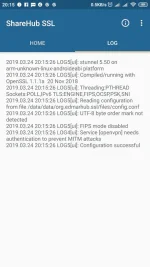
5. Open ShareHub SSL > Input server ip from #3 > then click start
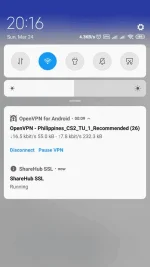
6. Open OpenVPN for android go to settings enable OpenVPN 3x (see image attached) > import > connect
7. Kaboom Connected xD
Screenshot:
Quoted Feedbacks
Works on SUN TU50 / TU60 / TU150
PC (Fried & Toasted medyo matagal na naming gamit to tas Hotspot nalang)
1. Download & Install OpenVPN for PC here You do not have permission to view the full content of this post. Log in or register now.
2. Download & Install Stunnel for PC here You do not have permission to view the full content of this post. Log in or register now.
Look for 32bit version here ftp://ftp.stunnel.org/stunnel/archive/5.x/
(C) to Helgafjell Crematoria
3. Create an account on LibreVPN > OpenVPN here You do not have permission to view the full content of this post. Log in or register now.
4. Download Configuration here select DIRECT CONNECTION & SSL Beta on Authentication Type You do not have permission to view the full content of this post. Log in or register now.
ds.html5. Open Stunnel for PC > right click stunnel tray icon > Edit Configuration > delete all content & paste this then save (note to change server ip from #3)
Code:
[openvpn]
client = yes
accept = 8888
connect = SERVER_IP:587
sni = z-p3-cdn.fbsbx.com

cert = stunnel.pem
Screenshot:
then right click > Reload Configuration
6. OpenVPN > Import OpenVPN .conf file from #4 > Connect
7. Kaboom Connected xD
Note: For Linux just add this line on your openvpn config para may internet na ibabato sayo
Code:
up /etc/openvpn/update-resolv-conf
down /etc/openvpn/update-resolv-conf
Mobile
1. Download & Install OpenVPN for android
You do not have permission to view the full content of this post. Log in or register now.
2. Download & Install ShareHub SSL (Copy this link on chrome)
You do not have permission to view the full content of this post. Log in or register now.
3. Create an account on LibreVPN > OpenVPN here You do not have permission to view the full content of this post. Log in or register now.
4. Download Configuration here select DIRECT CONNECTION & SSL Beta on Authentication Type You do not have permission to view the full content of this post. Log in or register now.
5. Open ShareHub SSL > Input server ip from #3 > then click start
6. Open OpenVPN for android go to settings enable OpenVPN 3x (see image attached) > import > connect
7. Kaboom Connected xD
Screenshot:
Quoted Feedbacks
connected lakas nito
nilabas mo din,..good to know each other sir..
but anyway gumagana talaga sa naka promo..
pero,ayaw talaga sa no load at with load...
sa globe at tm...kaya tinigil ko muna pansamantala..
baka bubuksan nila ang pinto ni bibo.
Maraming salamat po dito sir.
okay na sir. salamat


 sad life di makapag laro wala ovpn for ios TT