 PH
PHmiscellaneousfools
Honorary Poster
How to have youtube premium feels without being annoyed by ads and can stream video even with the screen has timed out or screen is locked?
Well, you have come to right place.
Before anything will start, I will credit this app to those developers who made this for us to use!
So let's start!
1. First things you need to go the site indicated on the screenshot below:

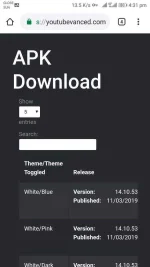
2. This is the site looks like, next is; you need to scroll down till you come to this point

(So you need to choose from this whether you're non-rooted or rooted or magisk rooted.)
3. You need install the apk and choose from the preference you like and make sure to look at the build number if it is the latest or not just use common sense
4.Next, you need to install it's driver called MicroG so that you can access your google account or so that you can sign in your google account into your new youtube interface.

5. Lastly, be happy you now have premium feel youtube with background usage of youtube (even with the screen is locked) and no ads.
Thank me later when it's successful and drop a like and feedback.
Kampai!
Well, you have come to right place.
Before anything will start, I will credit this app to those developers who made this for us to use!
So let's start!
1. First things you need to go the site indicated on the screenshot below:
2. This is the site looks like, next is; you need to scroll down till you come to this point
(So you need to choose from this whether you're non-rooted or rooted or magisk rooted.)
3. You need install the apk and choose from the preference you like and make sure to look at the build number if it is the latest or not just use common sense
4.Next, you need to install it's driver called MicroG so that you can access your google account or so that you can sign in your google account into your new youtube interface.
5. Lastly, be happy you now have premium feel youtube with background usage of youtube (even with the screen is locked) and no ads.
Thank me later when it's successful and drop a like and feedback.
Kampai!


