PH
PH
Boss James Pede paturo step by step po... plssss saka po pede pa add ng ma I pm ko po kau?? plsss
Eto po fB acc ko You do not have permission to view the full content of this post. Log in or register now. salamat
boss pwede naman po dito.,ipm.,sir nasa first page po yung tutorial.,we prefer po na kayo mismo ang tumuklas.,para kahit wala kami.,marunong po kayu.Boss James Pede paturo step by step po... plssss saka po pede pa add ng ma I pm ko po kau?? plsss
Eto po fB acc ko You do not have permission to view the full content of this post. Log in or register now. salamat
boss pwede naman po dito.,ipm.,sir nasa first page po yung tutorial.,we prefer po na kayo mismo ang tumuklas.,para kahit wala kami.,marunong po kayu.

ayos yan broimbaustic xSilent SORRY for late reply mga boss .
gamit ko config ni boss xsilent + psihpon3 ni boss james para sa bypass .
boss imbaustic , gawa ka muna proxi rules. eto po settings,
(any name)
application: (launch.exe;patcher.exe;godswar.exe;launcher.exe) para surepwede mo e remove yung hindi kasali
action: https 127.0.0.1 3128 .
yan na
first run po ang godswar.exe, pagnakapasok na yun na naman launcher.exe ang next na e run .
basta first time hindi ka makapasok . mahirap . pero pag naka pasok kana gamit launch(er).exe .. tuloy2 na yan
feedback mga boss ha
sa gusto maglaro ng mga newbie , ss attached .
 good to hear that
 ayos yan bro
Salamat po na Bypass din hehe..

punta ka mismong thread.,then basa mode bossMga boss pano ba yung Ipv^6 nyu..??
hindi ko magawa eh..
salamat mga boss.. ok na po napagana ko narin hahasalamat mga boss.. ok na po napagana ko narin haha
eto po SS.. salamat
bat yung sakin iisa lang yung nsa proxifier..??
 Paano mo maredirect yung traffic sa Proxifier?
 di natin need yun (pwede din yun gamitin kung gugustuhin ninyo
  )
)salamat dito .. \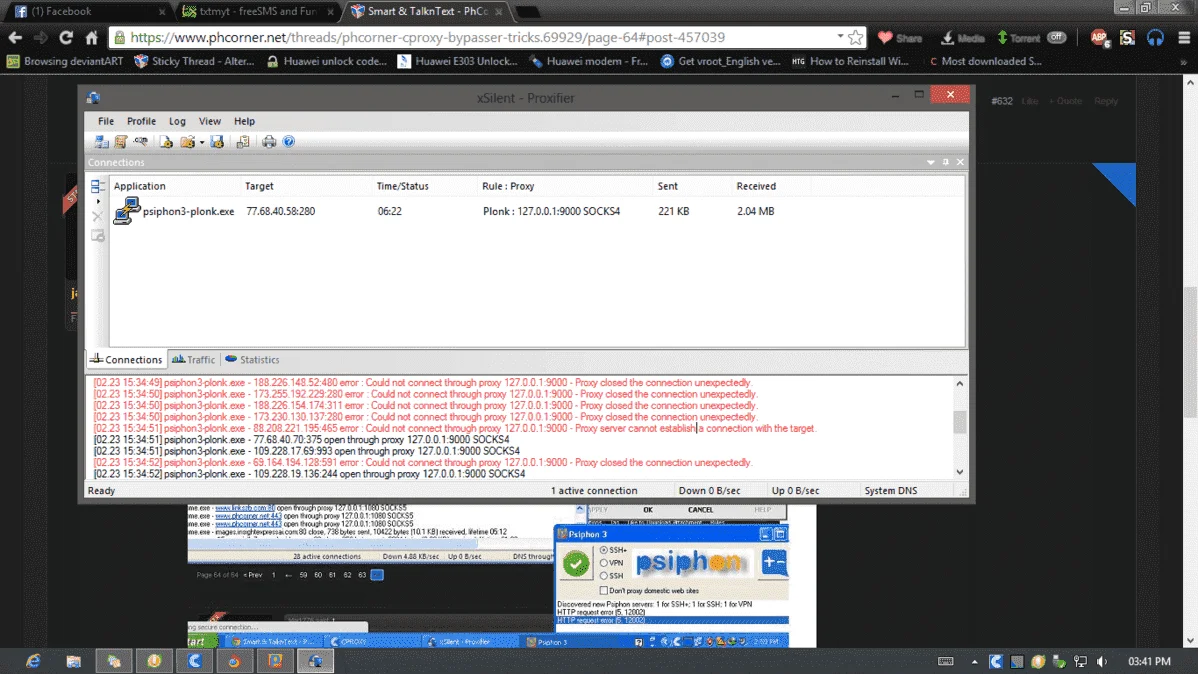
kasi...
kung gusto mong ilagay jan sa Proxifier boss, eto gawin mo
- Google Chrome gamit mo..
- Direct connection basta si Google Chrome so di mo sya makikita sa Proxifier..
From Page 10...
Google Chrome user ka ba?
After mong magawa yung Settings ko sa itaas ^ , gawin mo ito
- You do not have permission to view the full content of this post. Log in or register now.
- After lumabas nung extension, close mo agad yung window
- Click Direct Connection
View attachment 13321- See what happens
View attachment 13322- Explanation:
Dahil na redirect na natin ang traffic sa Proxifier, ang gamit nalang na proxy ni Google Chrome ngayon ay SOCKSV5 127.0.0.1 port 1080
Effect:
Bibilis na po yung browsing experience ninyo using Psiphon3 on Chrome
wow . nice .salamat bro . kagabi ko pa pinagpapalit palit ang mga ports eh . testingin ko
crisspanget ok na bro salamat . tanong ko lang . halimbawa 100mb na yong CProxy ok parin sya ?

basta before 100mb ka mag log in . ok pa yan , wag mo lang e exit . pero pag lagpas 100 mb na , kelangan po change acc ka ni cproxy . hehenakapasok parin ako kahit lampas ng 100mb . basta rekta yong godswar.exe ang ioopenwow . nice .
oonakapasok parin ako kahit lampas ng 100mb . basta rekta yong godswar.exe ang ioopen
kasi continuous yung usage nia ng data so if continuous, bypass talaga 
tama ka dyan bro . napakaganda talaga nitong trick ni boss jamesoo
gaya din ng pag DDL, di sya napuputo kasi continuous yung pag receive nia ng data