Status
Not open for further replies.
Sa mga gusto nito

nilagay ko nalang dito :D

Google Chrome user ka ba? o_O Paano mo maredirect yung traffic sa Proxifier?

After mong magawa yung Settings ko sa itaas ^ , gawin mo ito (y)
  1. You do not have permission to view the full content of this post. Log in or register now.
  2. After lumabas nung extension, close mo agad yung window :LOL: di natin need yun (pwede din yun gamitin kung gugustuhin ninyo :ROFLMAO: )
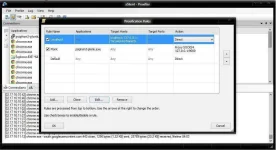
  3. Click Direct Connection :D
    View attachment 13321
  4. See what happens :D
    View attachment 13322
  5. Explanation:
    Dahil na redirect na natin ang traffic sa Proxifier, ang gamit nalang na proxy ni Google Chrome ngayon ay SOCKSV5 127.0.0.1 port 1080


    Effect:
    Bibilis na po yung browsing experience ninyo using Psiphon3 on Chrome
hades88 hilfa


Attachments

Sa winsock mo yan dude follow my steps dude to make it work

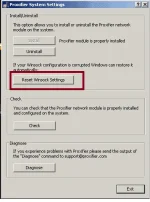
Go to My Computer > Local disk kung saan nakainstall ang os tapos > Program files > Proxifier > and find SysSettings32 for 32 bit OS and SysSettings64 for 64 bit OS. Double click sysSettings tapos ito:
winsoxc.webp


tsaran restart pc ka na kaboom connect mo na ulet
bakit hindi ako makapag quote ?
 
pahelp nman po aq sa proxifier.ito po kc lub=malabas if inoopoen q proxifier:

[02.16 20:41:01] Error: Windows network (Winsock) is not properly configured to work with Proxifier.
[02.16 20:41:01] Proxifier or some of its parts may work incorrectly.
[02.16 20:41:01] It is highly recommended that you run SysSettings tool to address this problem.

anu po b ung prob.at pnu ung solution?

Sa winsock mo yan dude follow my steps dude to make it work

Go to My Computer > Local disk kung saan nakainstall ang os tapos > Program files > Proxifier > and find SysSettings32 for 32 bit OS and SysSettings64 for 64 bit OS. Double click sysSettings tapos ito:
View attachment 13504

tsaran restart pc ka na kaboom connect mo na ulet
Follow mo to dude give it a try :D
 
Sa mga gusto nito

nilagay ko nalang dito :D

Google Chrome user ka ba? o_O Paano mo maredirect yung traffic sa Proxifier?

After mong magawa yung Settings ko sa itaas ^ , gawin mo ito (y)
  1. You do not have permission to view the full content of this post. Log in or register now.
  2. After lumabas nung extension, close mo agad yung window :LOL: di natin need yun (pwede din yun gamitin kung gugustuhin ninyo :ROFLMAO: )
  3. Click Direct Connection :D
    View attachment 13321
  4. See what happens :D
    View attachment 13322
  5. Explanation:
    Dahil na redirect na natin ang traffic sa Proxifier, ang gamit nalang na proxy ni Google Chrome ngayon ay SOCKSV5 127.0.0.1 port 1080


    Effect:
    Bibilis na po yung browsing experience ninyo using Psiphon3 on Chrome
hades88 hilfa
dami mo nang na contribute.,salamat sa mga ito.,(y)
 
Sa mga gusto nito

nilagay ko nalang dito :D

Google Chrome user ka ba? o_O Paano mo maredirect yung traffic sa Proxifier?

After mong magawa yung Settings ko sa itaas ^ , gawin mo ito (y)
  1. You do not have permission to view the full content of this post. Log in or register now.
  2. After lumabas nung extension, close mo agad yung window :LOL: di natin need yun (pwede din yun gamitin kung gugustuhin ninyo :ROFLMAO: )
  3. Click Direct Connection :D
    View attachment 13321
  4. See what happens :D
    View attachment 13322
  5. Explanation:
    Dahil na redirect na natin ang traffic sa Proxifier, ang gamit nalang na proxy ni Google Chrome ngayon ay SOCKSV5 127.0.0.1 port 1080


    Effect:
    Bibilis na po yung browsing experience ninyo using Psiphon3 on Chrome
hades88 hilfa
pa try sir xSilent (y) 
ipv6 by sir james+proxifier by sir xSilent+ psiphon :D
 

Attachments

  • Untitled.webp
    Untitled.webp
    39.4 KB · Views: 19
Sa mga gusto nito

nilagay ko nalang dito :D

Google Chrome user ka ba? o_O Paano mo maredirect yung traffic sa Proxifier?

After mong magawa yung Settings ko sa itaas ^ , gawin mo ito (y)
  1. You do not have permission to view the full content of this post. Log in or register now.
  2. After lumabas nung extension, close mo agad yung window :LOL: di natin need yun (pwede din yun gamitin kung gugustuhin ninyo :ROFLMAO: )
  3. Click Direct Connection :D
    View attachment 13321
  4. See what happens :D
    View attachment 13322
  5. Explanation:
    Dahil na redirect na natin ang traffic sa Proxifier, ang gamit nalang na proxy ni Google Chrome ngayon ay SOCKSV5 127.0.0.1 port 1080


    Effect:
    Bibilis na po yung browsing experience ninyo using Psiphon3 on Chrome
hades88 hilfa
Napansin ko Lang bro naka Direct ung default ko pag Load ko nung proxifier mu .. wala naba kong babaguhin dito ? :D
Capture.JPG
 
Status
Not open for further replies.

About this Thread

  • 952
    Replies
  • 98K
    Views
  • 121
    Participants
Last reply from:
adiktous_alpha

Online now

Members online
346
Guests online
2,340
Total visitors
2,686

Forum statistics

Threads
2,269,907
Posts
28,932,190
Members
1,241,681
Latest member
noname9922
Back
Top