Status
Not open for further replies.
Salamat Dito :D
Untitled.webp
 
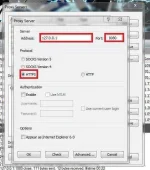
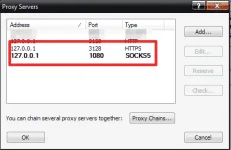
1)gawa ka ng server, gayahin nalang yung SS, pwede din ang SOCKS 5 palitan lang yung port 8080 ng 1080
1.webp


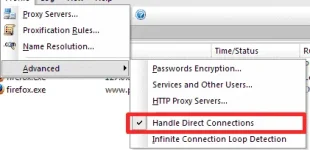
2)
2.webp


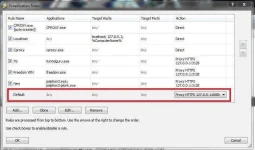
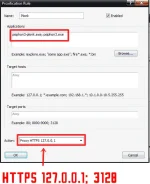
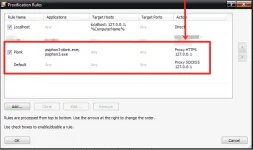
3)palitan nyu ung action ng default ng server na ginawa natin sa step 1, pwede din ang SOCKS 5...
Note: kung cproxy lang ulit ang gagamitin mo palitan mo ulit ung action ng default ng para sa cproxy na http-127.0.0.1:3128 or sock 4-127.0.0.1:9000
3.webp


4)konek mo na yung vpn ni sir james...
 
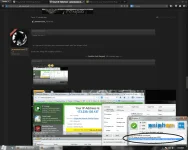
Eto na SS ko boss jamesiswizard_1

May iniba lang ako :D base sa experience ko sa CPROXY+Proxifier (y)


  1. upload_2014-2-7_22-45-43.webp

  2. upload_2014-2-7_22-48-12.webp
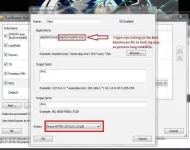
  3. Copy this and paste sa Applications
    Code:
    psiphon3-plonk.exe; psiphon3.exe
    upload_2014-2-7_22-53-6.webp


  4. upload_2014-2-7_22-50-13.webp

  5. Connect mo na ang PSiPhon3.exe :happy: (y)
Advantage: You can experience IPv^6 of boss jamesiswizard_1 kasi supported ng Socksv5 ang ipv^6 :D
Enjoy mga bossings :D
another bypasser galing talga d2 sa phcorner
oo naman po :happy: si boss jamesiswizard_1 na kasi ang nag post :D
 
thanks matry nga


sir james pano mag HTTP ? https lang tapos socks 4 at 5 lang eh

Boss Https Gagamitin Mo Dyan :D

tnx sa info boss:)

still trying parin boss

yun oh! :D nakagawa din nang paraan :happy:
View attachment 13255

Wait, gawa ako ng SS :ROFLMAO:

1)gawa ka ng server, gayahin nalang yung SS, pwede din ang SOCKS 5 palitan lang yung port 8080 ng 1080
View attachment 13251

2)
View attachment 13252

3)palitan nyu ung action ng default ng server na ginawa natin sa step 1, pwede din ang SOCKS 5...
Note: kung cproxy lang ulit ang gagamitin mo palitan mo ulit ung action ng default ng para sa cproxy na http-127.0.0.1:3128 or sock 4-127.0.0.1:9000
View attachment 13253

4)konek mo na yung vpn ni sir james...

yun oh nagawa din sawakas :D xD

another bypasser galing talga d2 sa phcorner

Eto na SS ko boss jamesiswizard_1

May iniba lang ako :D base sa experience ko sa CPROXY+Proxifier (y)


  1. View attachment 13257

  2. View attachment 13258
  3. Copy this and paste sa Applications
    Code:
    psiphon3-plonk.exe; psiphon3.exe
    View attachment 13261

  4. View attachment 13259
  5. Connect mo na ang PSiPhon3.exe :happy: (y)
Advantage: You can experience IPv^6 of boss jamesiswizard_1 kasi supported ng Socksv5 ang ipv^6 :D
Enjoy mga bossings :D
oo naman po :happy: si boss jamesiswizard_1 na kasi ang nag post :D

untitled-png.13248
upload_2014-2-7_22-35-23-png.13255
1-jpg.13251


2)
2-jpg.13252


3)palitan nyu ung action ng default ng server na ginawa natin sa step 1, pwede din ang SOCKS 5...
Note: kung cproxy lang ulit ang gagamitin mo palitan mo ulit ung action ng default ng para sa cproxy na http-127.0.0.1:3128 or sock 4-127.0.0.1:9000
3-jpg.13253
untitled-png.13260


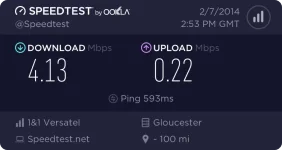
salamat sa lahat ng Nag try, nag feed back at tumulong para sa ating Freenet.,salamat sa mga scrren shot.,
 
untitled-png.13248
upload_2014-2-7_22-35-23-png.13255
1-jpg.13251


2)
2-jpg.13252


3)palitan nyu ung action ng default ng server na ginawa natin sa step 1, pwede din ang SOCKS 5...
Note: kung cproxy lang ulit ang gagamitin mo palitan mo ulit ung action ng default ng para sa cproxy na http-127.0.0.1:3128 or sock 4-127.0.0.1:9000
3-jpg.13253
untitled-png.13260


salamat sa lahat ng Nag try, nag feed back at tumulong para sa ating Freenet.,salamat sa mga scrren shot.,
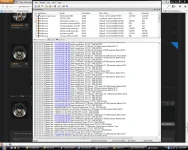
hehehe (y)Ang linis na ng Proxifier ko :D wala nang error dahil sa ipv^6 :happy:
upload_2014-2-7_23-16-2.webp
 
Status
Not open for further replies.

About this Thread

  • 952
    Replies
  • 98K
    Views
  • 121
    Participants
Last reply from:
adiktous_alpha

Online now

Members online
1,100
Guests online
2,120
Total visitors
3,220

Forum statistics

Threads
2,269,595
Posts
28,929,901
Members
1,241,499
Latest member
idroidxtech
Back
Top