PH
PHcrisspanget
Eternal Poster
UPDATE : BASA BASA DIN PO PAG MAY TIME NAMAN . 
PALITAN YUNG ZERO SA WORD NA D0WNLOAD TO LETTER "O" PARA WALANG ERROR.
DONT FORGET TO CLEAR BROWSER'S CACHE COOKIES HISTORY para iwas ERROR
IF ERROR PARIN RESTART THE PROCESS .
check if:
connected sa smart buddy sim (modem dashboard)
connected to cproxy
tama ang settings
browser has not using proxy dapat set to no proxy
UPDATE February 8 2014 :
sa mga ka PHC na nahirapan kung paano paganahin o e configure may ibibigay akong link na ready to use na .
file name po nya ay "ready to eat, este ready to use pala"
D0wnload: You do not have permission to view the full content of this post. Log in or register now.
enjoy po . feedback naman kung napagana nyo ha ..thanks !!
 ETO NAMAN ! GUSTO NYO FULL SPEED FULL SIGNAL ANG BROADBAND NYO ? NASA TEXFILE ANG LAHAT NG PROCEDURE TAPOS SABAYIN NIYO ANG TRICK NA ETO
Procedure D0wnload: You do not have permission to view the full content of this post. Log in or register now.
source : instructables
para mas malinawan click sa baba
Please D0wnload images: You do not have permission to view the full content of this post. Log in or register now.
source: goog le images
password : phcornercris
feedback kung working
good morning mga ka-PHC ! share ko lang . delete if duplicated nlng po ha .
tools needed:
Cproxy (Original Ver. or Portable)
Proxifier specifically version 2.91 (D0WNL0AD LINK BELOW) :arghh:
Connected smart broadband syempre
Procedure:
connect smart
connect cproxy
open proxifier
click OPTION
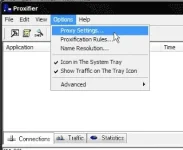
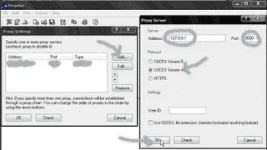
proxy settings -> add -> 127.0.0.1 - 9000 - socket 4 -> OK
proxification rules -> add -> application -> find and select cproxy exe application -> OK
advance -> uncheck "redirect https traffic...." -> OK
SET YOUR BROWSER TO NO PROXY
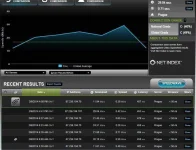
SPEEDTEST -> dapat sa ibang bansa ang ip nyo , hindi sa philippines . bahala na ang speedtest na pumili ng server na malapit sayo .
CLICK NYO TO PARA MAKITA PROOF)
Speedtest profile You do not have permission to view the full content of this post. Log in or register now.
youtube proof View: http://www.youtube.com/watch?v=djt_a9BPKw8&feature=phc.onl/#forbidden#
feedback and questions para ma tulungan ko kayo ha
Link Proxifier
Change d0wnload word to letter "O" kasi naka zero yan kaya not found You do not have permission to view the full content of this post.
Log in or register now.
gamit ko Smartbro MF180 or Globe tatto E153u-2 . 3G/HSPA/HSDPA .
PALITAN YUNG ZERO SA WORD NA D0WNLOAD TO LETTER "O" PARA WALANG ERROR.
DONT FORGET TO CLEAR BROWSER'S CACHE COOKIES HISTORY para iwas ERROR
IF ERROR PARIN RESTART THE PROCESS .
check if:
connected sa smart buddy sim (modem dashboard)
connected to cproxy
tama ang settings
browser has not using proxy dapat set to no proxy
UPDATE February 8 2014 :
sa mga ka PHC na nahirapan kung paano paganahin o e configure may ibibigay akong link na ready to use na .
file name po nya ay "ready to eat, este ready to use pala"
D0wnload: You do not have permission to view the full content of this post. Log in or register now.
enjoy po . feedback naman kung napagana nyo ha ..thanks !!
ETO NAMAN ! GUSTO NYO FULL SPEED FULL SIGNAL ANG BROADBAND NYO ? NASA TEXFILE ANG LAHAT NG PROCEDURE TAPOS SABAYIN NIYO ANG TRICK NA ETOProcedure D0wnload: You do not have permission to view the full content of this post. Log in or register now.
source : instructables
para mas malinawan click sa baba
Please D0wnload images: You do not have permission to view the full content of this post. Log in or register now.
source: goog le images
password : phcornercris
feedback kung working
good morning mga ka-PHC !
share ko lang . delete if duplicated nlng po ha .tools needed:
Cproxy (Original Ver. or Portable)
Proxifier specifically version 2.91 (D0WNL0AD LINK BELOW) :arghh:
Connected smart broadband syempre
Procedure:
connect smart
connect cproxy
open proxifier
click OPTION
proxy settings -> add -> 127.0.0.1 - 9000 - socket 4 -> OK
proxification rules -> add -> application -> find and select cproxy exe application -> OK
advance -> uncheck "redirect https traffic...." -> OK
SET YOUR BROWSER TO NO PROXY
SPEEDTEST -> dapat sa ibang bansa ang ip nyo , hindi sa philippines . bahala na ang speedtest na pumili ng server na malapit sayo .
CLICK NYO TO PARA MAKITA PROOF
)Speedtest profile You do not have permission to view the full content of this post. Log in or register now.
youtube proof View: http://www.youtube.com/watch?v=djt_a9BPKw8&feature=phc.onl/#forbidden#
feedback and questions para ma tulungan ko kayo ha
Link Proxifier
Change d0wnload word to letter "O" kasi naka zero yan kaya not found
You do not have permission to view the full content of this post.
Log in or register now.gamit ko Smartbro MF180 or Globe tatto E153u-2 . 3G/HSPA/HSDPA .