 PH
PHmalinaw na po ba ? hahahakung naka gawa kana nung Connector ko sa dashboard.,dun kana sunod na lagi kumonect sa Connector ko kasi may kasamang tricks.,yung.,
at iwas detect pa dun kaysa broad band may Tracking.,
-
Welcome to PHCorner Forums! Sign up for free to unlock full access and exclusive privileges, including:
- Asking questions about computer and mobile issues
- Discovering internet tips for your mobile network and computer
You are using an out of date browser. It may not display this or other websites correctly.
You should upgrade or use an alternative browser.
You should upgrade or use an alternative browser.
🔒 Closed jamesiswizard_1 IPv^6 Tutorial & Tricks Updates
- Thread starter jamesiswizard_1
- Start date
-
- Tags
- acer android android apps broadband bug captiva cd-r king cproxy custom rom facebook fb free ayosdito trick free internet free social freenet galaxy s3 mini globe globe boradband globe wimax internet ip ipv6 ipv^6 jamesiswizard_1 load lte mangyan pasikat setting smart smart and talk and text smart broadband sun sun broadband tm tnt trick tricks tutorial wifi xsilent
- Status
- Not open for further replies.
ahh,kaya pala parehas na no internet access sa status.tama ba sir?kung naka gawa kana nung Connector ko sa dashboard.,dun kana sunod na lagi kumonect sa Connector ko kasi may kasamang tricks.,yung.,
at iwas detect pa dun kaysa broad band may Tracking.,
jamesiswizard_1
Elite
tama ka dyan.,It Serve As Anonymity Tools:dead:ahh,kaya pala parehas na no internet access sa status.tama ba sir?
No Mac

No Gateway
No Internet Access
But Browsing
Sana Tama Ako.,

pasensya na sir,malinaw din na sinabi ko na wala ko alam sa networking.malinaw na po ba ? hahaha
ok po sir.maraming salamattama ka dyan.,It Serve As Anonymity Tools:dead:
No Mac
No Gateway
No Internet Access
But Browsing

jamesiswizard_1
Elite
Sana Tama Ako.,ok po sir.maraming salamat
PHC-SCANMYVIRUS
Elite
kasi sir james lagi ako nagchecheck ng ipv6 after mag dc akodi naman tol.,bakit.,?
jamesiswizard_1
Elite
so gamtin mo na yung connector ko.,kasi sir james lagi ako nagchecheck ng ipv6 after mag dc ako
PHC-SCANMYVIRUS
Elite
ok sir ty uletso gamtin mo na yung connector ko.,

jamesiswizard_1
Elite
ok.,dun kana kumonect.,wag mo nang silipin pa kung connected sa Ipv^6 heheheok sir ty ulet
PHC-SCANMYVIRUS
Elite
nga pala sir james pag nilalagyan ko kasi ng dns yung ipv6 no browse si cproxy tas wala naman ping sakin , kaya hindi ko nalang nilalagyanok.,dun kana kumonect.,wag mo nang silipin pa kung connected sa Ipv^6 hehehe
jamesiswizard_1
Elite
option mo naman yan.,di ba sabi ko sa first page.,much better na wag lagyan.,.not practical na now a days ang mag lagay ng DNS.,.,nga pala sir james pag nilalagyan ko kasi ng dns yung ipv6 no browse si cproxy tas wala naman ping sakin , kaya hindi ko nalang nilalagyan
PHC-SCANMYVIRUS
Elite
kaya nga sir , tnks a lot sir sa info mo , keep it upoption mo naman yan.,di ba sabi ko sa first page.,much better na wag lagyan.,.not practical na now a days ang mag lagay ng DNS.,.,
jamesiswizard_1
Elite
welcome bro.,tulog mode na muna ako.,nakaka antok ang pagiging tambay.,kaya nga sir , tnks a lot sir sa info mo , keep it up
PHC-SCANMYVIRUS
Elite
sige po bro james sleep well , tambay ka ulet sa susunod ))
, tambay ka ulet sa susunod ))feedback ko lang:
delete ko lahat ng bb connection sa network and sharing center
now pumapalo na sa 900kbps browsing ko gamit connector ni sir jamesiswizard
cproxy portable-trial account-coolhousing.net server
Ayos!
EDIT:streaming status
360.92kbps pero walang putol kay youtube kahit nagda dropdown sa 158kbps.
haha,tomorow na lang fb ko sa dl,manonood si kumander
delete ko lahat ng bb connection sa network and sharing center
now pumapalo na sa 900kbps browsing ko gamit connector ni sir jamesiswizard
cproxy portable-trial account-coolhousing.net server
Ayos!
EDIT:streaming status
360.92kbps pero walang putol kay youtube kahit nagda dropdown sa 158kbps.
haha,tomorow na lang fb ko sa dl,manonood si kumander
jamesiswizard_1
Elite
ayos yan.,paste ko ito sa first page.,feedback ko lang:
delete ko lahat ng bb connection sa network and sharing center
now pumapalo na sa 900kbps browsing ko gamit connector ni sir jamesiswizard
cproxy portable-trial account-coolhousing.net server
Ayos!
jamesiswizard_1
Elite
updatedChecking if your Windows computer has the 5 GHz network band capability
Step 1:
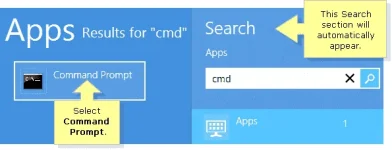
Press the Windowskey on your keyboard to access the Start screen. Type “cmd” until the search result appears under the Apps list. Select Command Prompt to open the application.
IMPORTANT: For Windows 8.1 you can right-click the Startbutton. Click Run then enter “cmd” on the field and press [Enter].
NOTE: For touch-enabled computers, swipe from the right side of the screen to reveal the Charms bar with the system commands.
QUICK TIP: The Search section will automatically appear once you type in any character from your keyboard.
Step 2:
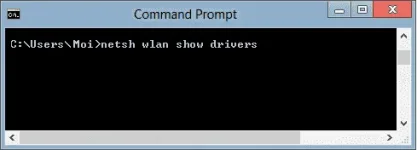
On the Command Prompt window, enter “netsh wlan show drivers” then press [Enter].
Step 3:
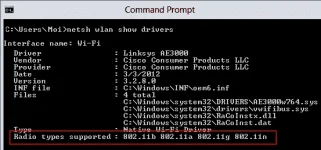
Look for the Radio types supported section. If it says that the network adapter supports 802.11a or 802.11n network modes, this means that the computer that you are using has the 5 GHz network capability.
In this example, the wireless adapter supports 802.11b, 802.11a, 802.11g, and 802.11n network modes. This means that the computer has the 5 GHz network band capability.
Windows 7/Vista
NOTE: A built-in wireless network adapter of a laptop computer is used for this example.
Step 1:
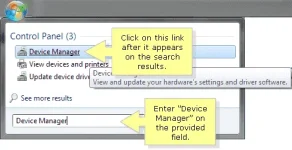
Click the Pearlbutton then enter “Device Manager” on the Search programs and files field. Click the Device Manager link once it appears on the search results.
Step 2:
On the Device Manager window, click Network adapters. Look for the name of your wireless adapter and check if it shows ABGN or AGN.
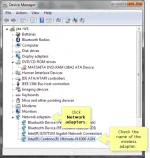
In this example, the wireless adapter is Intel(R) Centrino(R) Ultimate-N 6300 AGN. This means that the computer has the 5 GHz network band capability.
Windows XP
IMPORTANT: A built-in wireless network adapter of a laptop computer is used for this example.
Step 1:
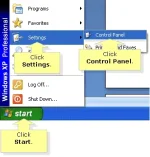
Click Start > Settings > Control Panel.
Step 2:
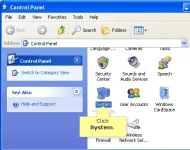
On the Control Panel window, double-click the System icon.
Step 3:
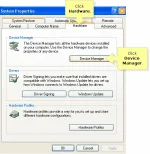
On the System Properties dialog box, click Hardware tab then click Device Manager.
Step 4:
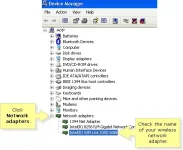
On the Device Manager window, click Network Adapters. Look for the name of your wireless adapter and check if it shows ABGN or AGN.
In this example, the wireless adapter is Intel® WiFi Link 5300 AGN. This means that the computer has the 5 GHz network band capability.
NOTE: To identify Linksys dual-band routers and devices that support both 2.4 GHz and 5 GHz bands, click here. For instructions on checking if your Mac computer is compatible with the 5 GHz frequency, click here.
Do you have a Linksys dual-band wireless router?
Linksys dual-band routers support both 2.4 GHz and 5 GHz networks. You can use both networks simultaneously or use just one (1). Choosing between the two (2) frequencies will enhance the application you will be using on the wireless network. To know more about differentiating the 5 GHz and 2.4 GHz bands, click here.
Some of My Old Tricks but Still Kicking and Helpful click nyo lang yung nasa baba nito.,
OLD TRICKS But Still Kicking
graymon62321
Enthusiast
sir, tanong ko lang para san po to? dik talaga kasi mapalabas yung ipv6 sa properties nung network connection. cproxy po gamit ko now ok naman po yung speed umaabot ng 1.50mbps pero gusto sana itry to baka mas mapabilis pa yung speed ko pero diko alam kung paano e, nagugulughan ako sensya napo 1st time ko po kasi gumamit neto.
jamesiswizard_1
Elite
nasa first page po yung tutorial.,pa ki basa po muna.,sir, tanong ko lang para san po to? dik talaga kasi mapalabas yung ipv6 sa properties nung network connection. cproxy po gamit ko now ok naman po yung speed umaabot ng 1.50mbps pero gusto sana itry to baka mas mapabilis pa yung speed ko pero diko alam kung paano e, nagugulughan ako sensya napo 1st time ko po kasi gumamit neto.
- Status
- Not open for further replies.
About this Thread
-
1KReplies
-
116KViews
-
106Participants
Last reply from:
khiano
khiano
New Topics
-
LOOKING FOR WIREGUARD SETUP IN MIKROTIK (WILLING TO PAY )
- Started by moreinformation
- Replies: 0
- 🚀 Freenet & Tunneling
-
MGa BOSS FREE VPN NA MAY PH SERVER PARA DITO SA AFRICA?
- Started by Junbiel 26
- Replies: 0
- 🚀 Freenet & Tunneling
-
PISOWIFI NO HULOG | (26-09-30) | NPV TUNNEL
- Started by Calcifeer
- Replies: 8
- 🚀 Freenet & Tunneling
-
[NOW WORKING] Youtube No Ads & Other Sites! via DNS
- Started by Lerps
- Replies: 26
- 🚀 Freenet & Tunneling
-
Free vpn can bypass captive portal
- Started by Darz2468
- Replies: 6
- 🚀 Freenet & Tunneling
-
Ano po gagawin pag ganto po?
- Started by jokejoke
- Replies: 3
- 🚀 Freenet & Tunneling
-
C pasabit pls need lang po sa edting
- Started by racetrack21
- Replies: 0
- 🚀 Freenet & Tunneling
Trending Topics
-
-
-
-
-
-
[FREE] Multi-hop VLESS + Cloudflare WARP configs (XHTTP / WS), privacy-focused
- Noahclanman
Replies: 3 -
Online now
- Members online
- 770
- Guests online
- 2,806
- Total visitors
- 3,576