🔒 Closed For Android Users na 6.0 higher na lagi napupuno internal storage. Here is one way how to change your install location to SD CARD.

Status
Not open for further replies.

Pettitoes

Eternal Poster
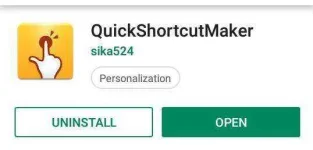
  1. Download this app
    You do not have permission to view the full content of this post. Log in or register now.
  2. pag na install na open the app and write "prefer" on the search tab
  3. click mo settings then makikita mo yung preferred install location click mo
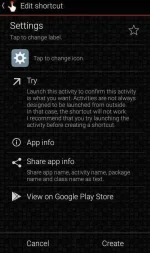
4.Then click Try and last ilipat sa SD card
P.s Please Feedback po and " Di lahat po ng apps pwede malipat sa SD CARD pero sa tingin ko kaya nya mga heavy games like ML.
update: gumagana sa mga vivo 6.0.1 version
-mabuting mamamayan ng PHC
 

Attachments

  • 52466018_1227745284049783_33441006208679936_n.jpg
    52466018_1227745284049783_33441006208679936_n.jpg
    19.8 KB · Views: 48
  • 52543559_1227745347383110_5831195755393581056_n.webp
    52543559_1227745347383110_5831195755393581056_n.webp
    65.4 KB · Views: 69
  • 52594504_1227745314049780_899907154452938752_n.jpg
    52594504_1227745314049780_899907154452938752_n.jpg
    39 KB · Views: 54
  • 52696055_1227745264049785_294512465901780992_n.webp
    52696055_1227745264049785_294512465901780992_n.webp
    10.5 KB · Views: 54
Matagal ko nang Tinry yan pero not working.
Na change na preferred install location Sa SD card pero Pag install ka Sa internal PA din Pasok🙃
 
Status
Not open for further replies.

About this Thread

  • 9
    Replies
  • 440
    Views
  • 8
    Participants
Last reply from:
Achilles25

Online now

Members online
973
Guests online
1,080
Total visitors
2,053

Forum statistics

Threads
2,275,634
Posts
28,964,551
Members
1,231,889
Latest member
Dodoy1234
Back
Top