 PH
PH How to encrypt or set password for a Folder?
Did you know that there is a way to encrypt your folder without using any 3rd party software? This is especially helpful if there are multiple users in the computer and you need to hide private files.
To perform this trick, follow the Instructions below:
1. Open a Notepad. Copy and paste the code;
cls
echo OFF
title Folder Private
if EXIST "Control Panel.{21EC2020-3AEA-1069-A2DD-08002B30309D}" goto UNLOCK
if NOT EXIST Private goto MDLOCKER
:CONFIRM
echo Are you sure you want to lock the folder(Y/N)
set/p "cho=>"
if %cho%==Y goto LOCK
if %cho%==y goto LOCK
if %cho%==n goto END
if %cho%==N goto END
echo Invalid choice.
goto CONFIRM
:LOCK
ren Private "Control Panel.{21EC2020-3AEA-1069-A2DD-08002B30309D}"
attrib +h +s "Control Panel.{21EC2020-3AEA-1069-A2DD-08002B30309D}"
echo Folder locked
goto End
:UNLOCK
echo Enter password to unlock folder
set/p "pass=>"
if NOT %pass%== PASSWORD_GOES_HERE goto FAIL
attrib -h -s "Control Panel.{21EC2020-3AEA-1069-A2DD-08002B30309D}"
ren "Control Panel.{21EC2020-3AEA-1069-A2DD-08002B30309D}" Private
echo Folder Unlocked successfully
goto End
:FAIL
echo Invalid password
goto end
:MDLOCKER
md Private
echo Private created successfully
goto End
:End
2. In the above code, replace the key PASSWORD_GOES_HERE with any password you would like to set for the folder to be access.
Example;
If NOT %pass%== mypassword123 goto FAIL
3. Save the file on the desktop as .bat
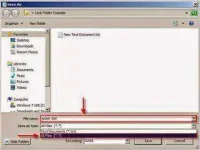
Example: locker.bat
4. Double click on the file you saved on the desktop, and a folder name Private will appear.

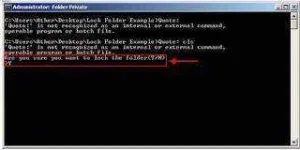
5. Upon exiting, double click on the .bat file again and it will prompt you with a command prompt “Are you sure you want to lock the folder(Y/N)”. Press Y on your keyboard and enter. The Private folder will disappear on the screen.
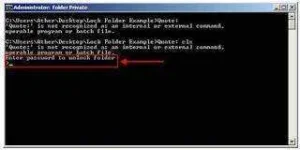
6. To retrieve the folder, double click on the .bat file and enter the password.
hit "Like"if you like my post
#jpotz
Did you know that there is a way to encrypt your folder without using any 3rd party software? This is especially helpful if there are multiple users in the computer and you need to hide private files.
To perform this trick, follow the Instructions below:
1. Open a Notepad. Copy and paste the code;
cls
echo OFF
title Folder Private
if EXIST "Control Panel.{21EC2020-3AEA-1069-A2DD-08002B30309D}" goto UNLOCK
if NOT EXIST Private goto MDLOCKER
:CONFIRM
echo Are you sure you want to lock the folder(Y/N)
set/p "cho=>"
if %cho%==Y goto LOCK
if %cho%==y goto LOCK
if %cho%==n goto END
if %cho%==N goto END
echo Invalid choice.
goto CONFIRM
:LOCK
ren Private "Control Panel.{21EC2020-3AEA-1069-A2DD-08002B30309D}"
attrib +h +s "Control Panel.{21EC2020-3AEA-1069-A2DD-08002B30309D}"
echo Folder locked
goto End
:UNLOCK
echo Enter password to unlock folder
set/p "pass=>"
if NOT %pass%== PASSWORD_GOES_HERE goto FAIL
attrib -h -s "Control Panel.{21EC2020-3AEA-1069-A2DD-08002B30309D}"
ren "Control Panel.{21EC2020-3AEA-1069-A2DD-08002B30309D}" Private
echo Folder Unlocked successfully
goto End
:FAIL
echo Invalid password
goto end
:MDLOCKER
md Private
echo Private created successfully
goto End
:End
2. In the above code, replace the key PASSWORD_GOES_HERE with any password you would like to set for the folder to be access.
Example;
If NOT %pass%== mypassword123 goto FAIL
3. Save the file on the desktop as .bat
Example: locker.bat
4. Double click on the file you saved on the desktop, and a folder name Private will appear.
5. Upon exiting, double click on the .bat file again and it will prompt you with a command prompt “Are you sure you want to lock the folder(Y/N)”. Press Y on your keyboard and enter. The Private folder will disappear on the screen.
6. To retrieve the folder, double click on the .bat file and enter the password.
hit "Like"if you like my post
#jpotz
