 PH
PHHello Mga Paps at Sis
Since first time ko po magpost dito sa forum I will share a newly discovered app for android that automatically swipes for you kahit na wala ang inyong mga finger tips sa screen ng smartphone ninyo.
This are the following requirements:
Android phone - I don't know kung kahit anong android version pwede ung app kayong na po ang mgdiscover.
Automatic clicker - You do not have permission to view the full content of this post. Log in or register now.
Basic Knowledge to setup sa android smartphone.
First download ninyo po ung Automatic Clicker app - link above or search nyo n lang po sa google playstore

Ganyan po ung image icon ng Automatic Clicker
Then Install it...
After that may lalabas na mga permission to Enable specially po sa Accessibilty Settings
Sa Akin po Automatic po na pumunta sa Setting tapos hinanap ko lang po ang Automatic Clicker
Then open the app
Then Start Multi-Target
May lalabas sa gilid ng screen nyo
Hold the + button at may lalabas na start at end na linked para mag swipe

Then Tap the Setting Icon of the Multi-Target
Setup the Delay for 2.5 seconds and Duration for 0.15 second pero pwede nyo pa iadjust kung saan kau comfortable.

Then Tap the Manage Configurations and Tap + sign and Give it a name for the File then Save

Then Open Chrome and login your btcspinner.io account and play
Make Sure na ang Start at End ay Nasa Both side ng spinner and naka linya sila sa horizontally sa gitna ng spinner.

Then Tap the setting Icon sa Tabi ng Screen. then tap load and choose the config that you save. Then tap update.
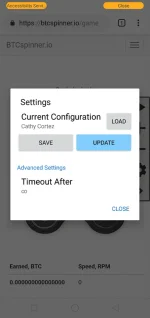
Then Tap Play Icon.
Then the Spinner Continiously Spins Infinite...
Sana po makatulong po sa inyo...
Incase ma hindi umikot... adjust nyo na lang po yung line ng swipe...
Sorry Beginner lang po ako at first time ko lang po mag post dito sa forum...
Thank you and GodBless...
Since first time ko po magpost dito sa forum I will share a newly discovered app for android that automatically swipes for you kahit na wala ang inyong mga finger tips sa screen ng smartphone ninyo.
This are the following requirements:
Android phone - I don't know kung kahit anong android version pwede ung app kayong na po ang mgdiscover.
Automatic clicker - You do not have permission to view the full content of this post. Log in or register now.
Basic Knowledge to setup sa android smartphone.
First download ninyo po ung Automatic Clicker app - link above or search nyo n lang po sa google playstore
Ganyan po ung image icon ng Automatic Clicker
Then Install it...
After that may lalabas na mga permission to Enable specially po sa Accessibilty Settings
Sa Akin po Automatic po na pumunta sa Setting tapos hinanap ko lang po ang Automatic Clicker
Then open the app
Then Start Multi-Target
May lalabas sa gilid ng screen nyo
Hold the + button at may lalabas na start at end na linked para mag swipe
Then Tap the Setting Icon of the Multi-Target
Setup the Delay for 2.5 seconds and Duration for 0.15 second pero pwede nyo pa iadjust kung saan kau comfortable.
Then Tap the Manage Configurations and Tap + sign and Give it a name for the File then Save
Then Open Chrome and login your btcspinner.io account and play
Make Sure na ang Start at End ay Nasa Both side ng spinner and naka linya sila sa horizontally sa gitna ng spinner.
Then Tap the setting Icon sa Tabi ng Screen. then tap load and choose the config that you save. Then tap update.
Then Tap Play Icon.
Then the Spinner Continiously Spins Infinite...
Sana po makatulong po sa inyo...
Incase ma hindi umikot... adjust nyo na lang po yung line ng swipe...
Sorry Beginner lang po ako at first time ko lang po mag post dito sa forum...
Thank you and GodBless...