 PH
PHwyndell vengco
Leecher
Anu po ba ang working ngayon sa Luzon Area, CP proxy, Jap Jondo, o PD Proxy? Patulong naman po! Salamat ka PHC!
Sir, pahelp po panu gamitin? thanks
 )
)salamat po sir. pang smart lng po ba to? o pede globe?basahin mo tong thread ni mikedota2 dito; Sticky Thread - Alternative Free Internet using CPROXY
disposable email maker ni xSilent ; Tutorial - CPROXY - Disposable Mails (11/19/13 - Dinagdagan
smart buddy sakin, ung polka. puede din ata sa globe pero di ko pa na-try at ang madalas kong mabasa ay smart ang gamitsalamat po sir. pang smart lng po ba to? o pede globe?
salamat po sir, pede po ba sa skype to?smart buddy sakin, ung polka. puede din ata sa globe pero di ko pa na-try at ang madalas kong mabasa ay smart ang gamit
try na lang bro.. di ako nag-i-skype e..salamat po sir, pede po ba sa skype to?
sige po sir, salamattry na lang bro.. di ako nag-i-skype e..
sir, anu po pala gagamiting server? tsaka anung ip at port po?sige po sir, salamat
sir, anu po pala gagamiting server? tsaka anung ip at port po?
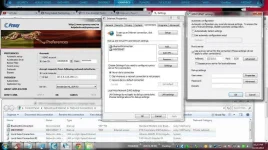
thank you boss!
welcome brothank you boss!
 mapapagana mo yan.. konting tiyaga lang, free net na!
Open Proxifier>Profile>Proxy Servers>hi panu po ba gamitin ang proxifier sasabog ang utak ko sa kakaisip kung paano ba to gamitin...may thread po ba na tutorial kung panu gamitin ang proxifier
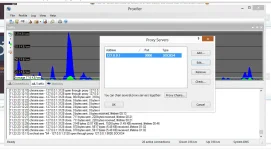
ok working sakin tol pero panu mag feedback hehe di ko alam....hina parin edge lang connection..di kasi maka connect 3gOpen Proxifier>Profile>Proxy Servers>
Address: 127.0.0.1
Port: 9000
(select socks version 4)
View attachment 11426
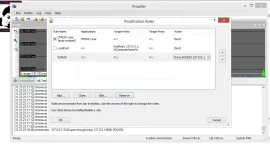
(Sa proxification rules mag aauto nalang)
View attachment 11427
press ok
Now connect dashboard with smart sim(bro,buddy)
Open cproxy(insert working user and password>connect with working server)
Open proxifier
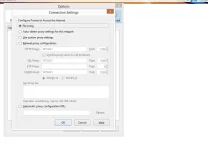
Open Mozilla firefox(make sure no proxy nakaset si firefox)
Then browse (FEED BACK KA PO KUNG NAPAGANA MO NA)
View attachment 11428
boss, sakin di ko mapagana!naka feed back ka na po sir.. =)
