PH
PHNote: You may bookmark or check this thread regularly for Poweramp craçked version updates.
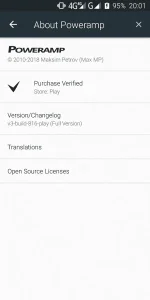
You can choose any player that supports lyrics viewing but I suggest use Poweramp V3-Build-816-Play. You can grab it on Playstore with time-trial of course; but you may also buy the premium unlocker, I don't know how much. See it for yourself. I have here premium unlocked ready to download, just navigate to the download link.
For embedding lyrics to an mp3 file, we need the application called Star Music Tag Editor. There might be other similar featured app but I recommend this one because of its user-friendly environment. This app is merely for tag editing, no built-in player.
Supposed you already installed the two applications, I want you to open the tag editor and grant permission required.
On the upper linear section, you can see the Song, Folder, Calendar, Album... tabs. Just stay on the Song.
Tap the name of the song you wanted to get embedded with lyrics.
Now you can see options to customized tags of the song such as Title, Album Cover, Artist... and so on.
If you downloaded your mp3 songs from websites with already built-in correct tags and album cover like You do not have permission to view the full content of this post. Log in or register now., then you don't have to edit anything. In case you don't, I suggest you to correct the tags for a better experience.
I suggest if you wanted to edit the album cover, do it inside the Poweramp. The suggested results are more high defined and accurate.
Scroll down until you see the lyrics section then tap 'search'. If the tags are correct; just tap search, if not; edit the keyword.
Now it will redirect you to your default browser. All you have to do is just highlight the lyrics and then copy it. It will automatically pasted on the lyric section.
Close the browser and go back to the tag editor. On the upper right, tap 'save'. You're all set.
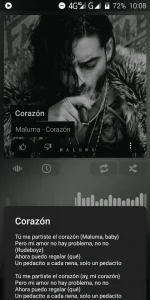
Open your Poweramp and play the song. To see the lyrics, just long-press on the album cover then tap 'lyrics'.
Download links:
Star Music Tag Editor
Star Music Tag Editor V2.0.3
You do not have permission to view the full content of this post. Log in or register now.
Updates will be via Google Play Store
Poweramp Premium Unlocked
Note: You may bookmark or check this thread regularly for Poweramp craçked version updates.
You can choose any player that supports lyrics viewing but I suggest use Poweramp V3-Build-816-Play. You can grab it on Playstore with time-trial of course; but you may also buy the premium unlocker, I don't know how much. See it for yourself. I have here premium unlocked ready to download, just navigate to the download link.
For embedding lyrics to an mp3 file, we need the application called Star Music Tag Editor. There might be other similar featured app but I recommend this one because of its user-friendly environment. This app is merely for tag editing, no built-in player.
Supposed you already installed the two applications, I want you to open the tag editor and grant permission required.
On the upper linear section, you can see the Song, Folder, Calendar, Album... tabs. Just stay on the Song.
Tap the name of the song you wanted to get embedded with lyrics.
Now you can see options to customized tags of the song such as Title, Album Cover, Artist... and so on.
If you downloaded your mp3 songs from websites with already built-in correct tags and album cover like You do not have permission to view the full content of this post. Log in or register now., then you don't have to edit anything. In case you don't, I suggest you to correct the tags for a better experience.
I suggest if you wanted to edit the album cover, do it inside the Poweramp. The suggested results are more high defined and accurate.
Scroll down until you see the lyrics section then tap 'search'. If the tags are correct; just tap search, if not; edit the keyword.
Now it will redirect you to your default browser. All you have to do is just highlight the lyrics and then copy it. It will automatically pasted on the lyric section.
Close the browser and go back to the tag editor. On the upper right, tap 'save'. You're all set.
Open your Poweramp and play the song. To see the lyrics, just long-press on the album cover then tap 'lyrics'.
Download links:
Star Music Tag Editor
Star Music Tag Editor V2.0.3
You do not have permission to view the full content of this post. Log in or register now.
Updates will be via Google Play Store
Poweramp Premium Unlocked
- V3-Build-818-Play
- V3-Build-816-Play
Note: You may bookmark or check this thread regularly for Poweramp craçked version updates.