 PH
PHRence_Ima04
Fanatic
patry po nito boss
^_^
^_^


Tried and tested sa Globe tattoo broadband with globe prepaid sim, mamaya try ko sa smartbro naman..Thanks for sharing po..more power..bilis eeh..
BARBIE_GIRL po..all caps.ate ano po yung password?
BARBIE_GIRL po..all caps.
Nag eexpire din yung account nito no? So paano po yun? pag magreregister for another account bawal yung disposable mail edi gagawa po ng madaming email ganun po ?

Aaah. okay get it..thanksOpo gagawa ka po ng panibagong email

PASSWORD: BARBIE_GIRL
Introducing JAP/JONDO for Globe & Smart - Another FREE INTERNET katapat ni CProxyPROCEDURES:
TESTED KO LANG SA SMART
(credits to J/J of course hihihi)
(rush po ang posting kaya pagtiyagahan niyo na lang po hihihi, aayusin ko ulit mamaya)

- Step 1. Download attachment and install hihihi
- Step 2. Create an account. (After Installation magpapakita si Personal Assistant. Sundan niyo lang instruction niya.)

Click niyo You do not have permission to view the full content of this post. Log in or register now. here!
Pwede kayong gumawa ng maraming account dito You do not have permission to view the full content of this post. Log in or register now.
katulad din ni cproxy hihihi
IMPORTANT: TEMPORARY & DISPOSABLE MAIL ACCOUNTS ARE NOT ACCEPTED HERE
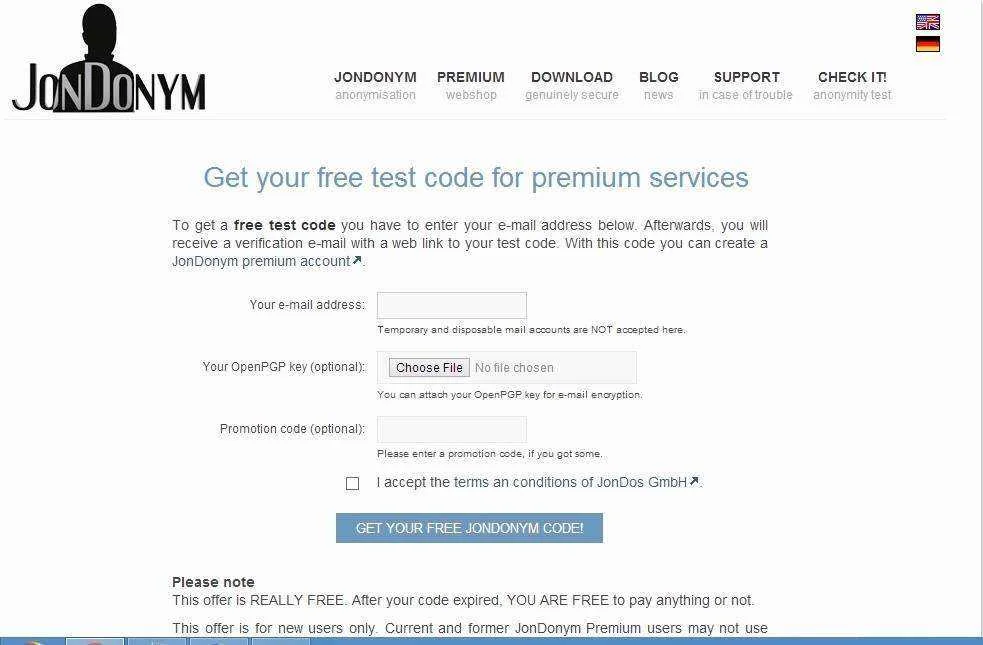

- Step 3. ACTIVATE YOUR ACCOUNT:
Your free JonDonym code: X511AB6B6033D64A (Sample)
You can use the JonDonym code to create your premium account. In JonDo you may use the assistant(1) or you may create a new account in the payment settings dialog box(2). Using the GUI-less JonDoConsole you may create the account with the command "coupon"(3).
1. option: Use the Assistant
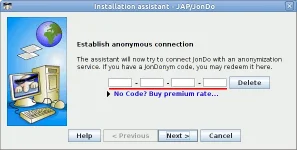
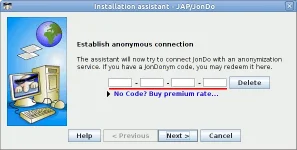
The assistant will open at first start of JonDo or every time you will click on the button "Assistant" in the main window. You can copy the code and create a premium account.
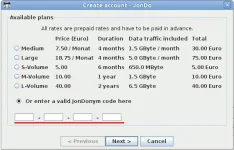
2. option: Create an Account
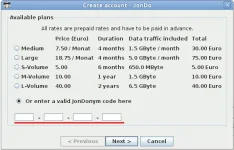
Alternatively, you may click on the Button "Create Account" in the main window or in the payment settings dialog box. A dialog will open and you can copy the JonDonym code to the form fields.
3. option: use JonDoConsole
If you were using the GUI-less JonDoConsole proxy you may create your account with the command "coupon".
JonDoConsole> coupon
Please enter a coupon code or type <ENTER> to skip.
JonDoConsole:code> X511AB6B6033D64A


Pwede ka ring pumili ng kahit anong server, working lahat ito hihihi

- Step 4: SET NIYO BROWSER:
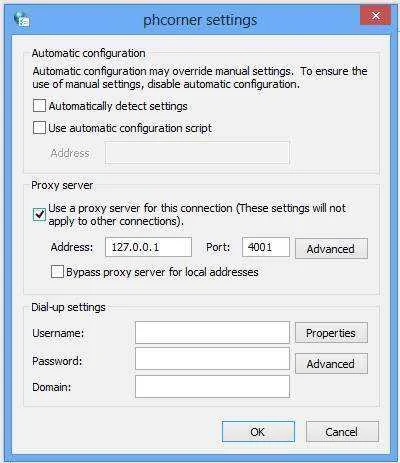
- Step 5: Enjoy Free Internet na hihi

bakit walang na send sakin na verification codemainit init pa yan ^_^
Na error po kapag may nilalagay akong bagong account dun sa Assistant kahit dun sa create new account. "The payment instance is unreachable" daw po, Ganto nalabas..
tsaka pag nagcoconect kelangan pa ng internet for example ung USURF kelangan naka connect bago xa maconnect ? not working na sigurp to! Ano to??PASSWORD: BARBIE_GIRL
Introducing JAP/JONDO for Globe & Smart - Another FREE INTERNET katapat ni CProxyPROCEDURES:
TESTED KO LANG SA SMART
(credits to J/J of course hihihi)
(rush po ang posting kaya pagtiyagahan niyo na lang po hihihi, aayusin ko ulit mamaya)
- Step 1. Download attachment and install hihihi
- Step 2. Create an account. (After Installation magpapakita si Personal Assistant. Sundan niyo lang instruction niya.)
Click niyo You do not have permission to view the full content of this post. Log in or register now. here!
Pwede kayong gumawa ng maraming account dito You do not have permission to view the full content of this post. Log in or register now.
katulad din ni cproxy hihihi
IMPORTANT: TEMPORARY & DISPOSABLE MAIL ACCOUNTS ARE NOT ACCEPTED HERE
- Step 3. ACTIVATE YOUR ACCOUNT:
Your free JonDonym code: X511AB6B6033D64A (Sample)
You can use the JonDonym code to create your premium account. In JonDo you may use the assistant(1) or you may create a new account in the payment settings dialog box(2). Using the GUI-less JonDoConsole you may create the account with the command "coupon"(3).
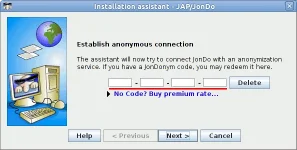
1. option: Use the Assistant
The assistant will open at first start of JonDo or every time you will click on the button "Assistant" in the main window. You can copy the code and create a premium account.
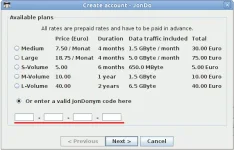
2. option: Create an Account
Alternatively, you may click on the Button "Create Account" in the main window or in the payment settings dialog box. A dialog will open and you can copy the JonDonym code to the form fields.
3. option: use JonDoConsole
If you were using the GUI-less JonDoConsole proxy you may create your account with the command "coupon".
JonDoConsole> coupon
Please enter a coupon code or type <ENTER> to skip.
JonDoConsole:code> X511AB6B6033D64A
Pwede ka ring pumili ng kahit anong server, working lahat ito hihihi
- Step 4: SET NIYO BROWSER:
- Step 5: Enjoy Free Internet na hihi
guma po sa globe tattoo ko kaso paano dagdagan yung free mb?PASSWORD: BARBIE_GIRL
Introducing JAP/JONDO for Globe & Smart - Another FREE INTERNET katapat ni CProxyPROCEDURES:
TESTED KO LANG SA SMART
(credits to J/J of course hihihi)
(rush po ang posting kaya pagtiyagahan niyo na lang po hihihi, aayusin ko ulit mamaya)
- Step 1. Download attachment and install hihihi
- Step 2. Create an account. (After Installation magpapakita si Personal Assistant. Sundan niyo lang instruction niya.)
Click niyo You do not have permission to view the full content of this post. Log in or register now. here!
Pwede kayong gumawa ng maraming account dito You do not have permission to view the full content of this post. Log in or register now.
katulad din ni cproxy hihihi
IMPORTANT: TEMPORARY & DISPOSABLE MAIL ACCOUNTS ARE NOT ACCEPTED HERE
- Step 3. ACTIVATE YOUR ACCOUNT:
Your free JonDonym code: X511AB6B6033D64A (Sample)
You can use the JonDonym code to create your premium account. In JonDo you may use the assistant(1) or you may create a new account in the payment settings dialog box(2). Using the GUI-less JonDoConsole you may create the account with the command "coupon"(3).
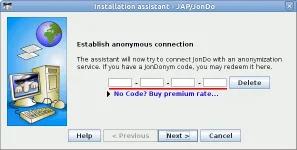
1. option: Use the Assistant
The assistant will open at first start of JonDo or every time you will click on the button "Assistant" in the main window. You can copy the code and create a premium account.
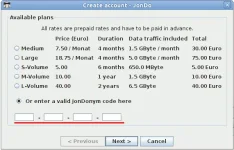
2. option: Create an Account
Alternatively, you may click on the Button "Create Account" in the main window or in the payment settings dialog box. A dialog will open and you can copy the JonDonym code to the form fields.
3. option: use JonDoConsole
If you were using the GUI-less JonDoConsole proxy you may create your account with the command "coupon".
JonDoConsole> coupon
Please enter a coupon code or type <ENTER> to skip.
JonDoConsole:code> X511AB6B6033D64A
Pwede ka ring pumili ng kahit anong server, working lahat ito hihihi
- Step 4: SET NIYO BROWSER:
- Step 5: Enjoy Free Internet na hihi
