PH
PHKhim Briones
Forum Expert
OUPENG BROWSER 6.6(29184) HALLOWEEN SEASON '13 RELEASE

¤Multiple Network Server¤
(Globe-MGC and Smart)
¤Convertible to Launcher Version¤
¤With Available Multiple Skin ρá†ch¤
¤Dual Resolution¤
¤Independent¤
Thanks to the person / persons who discovered the working free server for Smart Network and to ALL MODDERS.
¤Multiple Network Server¤
(Globe-MGC and Smart)
¤Convertible to Launcher Version¤
¤With Available Multiple Skin ρá†ch¤
¤Dual Resolution¤
¤Independent¤
Thanks to the person / persons who discovered the working free server for Smart Network and to ALL MODDERS.
Base Package Installation Notes:
1. Download and install the
Oupeng Browser 6.6(29184) HALLOWEEN EDITION™ [MultiServer].sis (Size: 1.6 MB / Downloads: 7) .
That is the Base Package.
2. During the installation, select only 1 Server from Optional files.


For better display of this browser, skin ρá†ch must be installed.
1. Download and install the
You do not have permission to view the full content of this post. Log in or register now.Skin ρá†ch - OB6.6(29184) HALLOWEEN EDITION™.sis (Size: 2.68 MB / Downloads: 7)
2. Select only 1 skin/resolution from Optional files during the installation of skin ρá†ch.

SKINS PREVIEW


1. GLOBE USERS
Simply connect to your Default MyGlobe Connect access point.
2. SMART USERS
Make customize access point and follow this settings:
APN: internet
DNS1: 8.8.8.8.
DNS2: 8.8.8.4.
PSA: 37.228.107.253
PORT: 80
Protocol Settings:
Go to Menu>Setting>Advance>Protocol and put the green check mark on HTTP.
Luncher ρá†ch Installation Notes:

1. Download and install the
You do not have permission to view the full content of this post. Log in or register now.Launcher ρá†ch-OB6.6(29184) HALLOWEEN EDITION™.sis (Size: 1.8 MB / Downloads: 4)
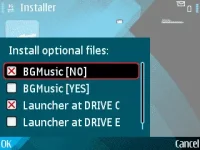
2. Select only 1 installation path for the Launcher depending on where the Oupeng Browser 6.6(29184) HALLOWEEN EDITION™ was installed. Refer to image below


3. For Music Background option, just simply mark MusicBG [Yes] if you want the music background and mark only MusicBG [No] if you dont want to have music background.

ATTACHMENT
4. There must be 2 marked Optional files during the installation.
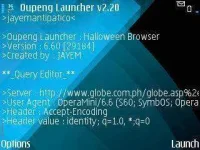
LAUNCHER PREVIEW
VIEW IN ATTACHMENT
ENJOY and HAPPY HALLOWEEN TO ALL!