 PH
PH

*Noted: Same procedure lang rin sa GTM. (ibahin lang ang payload if GTM ang gagawin or SMART/TNT)
SAMPLE TUTs for SUNTU50*
- First, Create OVPN Account Here
sample;


remember your account username password or paste it in notepad
- Second, After create VPN Account Download the Config

- Third, after download the VPN CONFIG, Open it.. (unzip first)

place the cursor above then Press enter to down the TEXT,, see picture! ( yan na ahh)
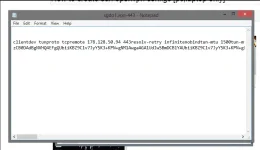
You need to copy or PUT the HEADER here;
pwedeng gawing proxy yung HOST nyo
Spoiler contents are visible only to Established Members.
SAMPLE;

*Dahil naka TCP tayo (Port 443)
hanap kayo ng RP na may Port na 80,8080,8000
Dito kayo maghanap: You do not have permission to view the full content of this post. Log in or register now.
- LAST, Open OPENVPN GUI right click, then select your finish Config then Put your USERNAME and PASSWORD, connect..

REMEMBER !!
wag nyong i SHARE yung nagawa nyong OVPN para di nag di DISCONNECT!!
Sarilihin nyo nalang
----
Walang INSTALLER?? NO Problem
Download Here;

Like naman jan, hirap kaya gumawa ng TUTS
 ??
??Note! Di lang for SUNTU yang procedure, pwede ring GTM or TNT , change payload lang tska ibahin ang timpla (depende sa payload)
[STILL WORKING] 2/26/19
 Follow me for MORE UPDATES HNH,HPI,EHI !!
► Johannus ◄
