PH
PHThis doesn't work anymore!
First, go to
You do not have permission to view the full content of this post. Log in or register now.
Fill up the text fields with complete details. Use fake email(get one from You do not have permission to view the full content of this post. Log in or register now.) for email verification. Don't close the temp-mail.org tab, you'll have to wait for the verification code.
Select "United States", Zip Code: "10005" as billing address and on the payment option, just select "AliPay".
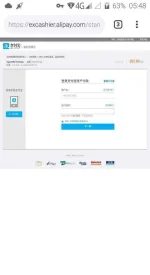
Tap submit and when it redirects you to AliPay website, simply close the tab.
Now, open the VyprVPN and log in using the credential you used above then it will send you a verification code.
Go back to the temp-mail.org website and find the email. Simply tap "view" then tap "source". Find the code and copy that.
Go back to VyprVPN and paste the code. You're all set.
That's all. Read carefully, I stated it vivid as spring water.
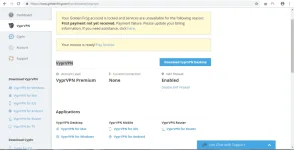
(See attachment for proof)
It costs you only a second to tap like.
First, go to
You do not have permission to view the full content of this post. Log in or register now.
Fill up the text fields with complete details. Use fake email(get one from You do not have permission to view the full content of this post. Log in or register now.) for email verification. Don't close the temp-mail.org tab, you'll have to wait for the verification code.
Select "United States", Zip Code: "10005" as billing address and on the payment option, just select "AliPay".
Tap submit and when it redirects you to AliPay website, simply close the tab.
Now, open the VyprVPN and log in using the credential you used above then it will send you a verification code.
Go back to the temp-mail.org website and find the email. Simply tap "view" then tap "source". Find the code and copy that.
Go back to VyprVPN and paste the code. You're all set.
That's all. Read carefully, I stated it vivid as spring water.
(See attachment for proof)
It costs you only a second to tap like.