PH
PHHow to unban device:
Method 1
Method 2 [Changing your mac address manually]
Method 3:

UNBAN DEVICE SOLVED!

Method 1
- Download TMAC Changer [You do not have permission to view the full content of this post. Log in or register now.]
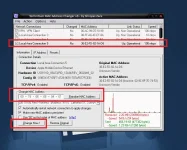
- Install Mac changer then open
- Find and select your network adaptor that you are using.
- Click for [Random Mac Address]
- Then click [Change now]
Method 2 [Changing your mac address manually]
- Go to Control Panel\Network and Internet\Network and Sharing Center
- Then click Change Adapter Settings
- Right click and click Properties your network adaptor that you are using.
- then click Configure below Connection using your adapter description.
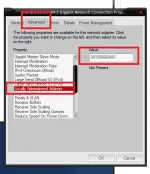
- New form will show click Advanced then find Locally Administered Address change it to your random new address then press Ok.
Method 3:
Spoiler contents are visible only to Established Members.
UNBAN DEVICE SOLVED!