 PH
PH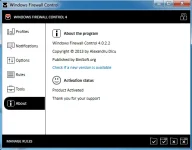
size: 245KB
Windows Firewall Control - is a nifty little application which extends the functionality of the Windows Firewall and provides quick access to the most frequent options of Windows Firewall. It runs in the system tray and allows user to control the native firewall easily without having to waste time by navigating to the specific part of the firewall. This is the best tool to manage the native firewall from Windows 8, Windows 7 and Windows Vista. Windows Firewall Control offers four filtering modes which can be switched with just a mouse click:
High Filtering - All outbound and inbound connections are blocked. This setting blocks all attempts to connect to and from your computer.
Medium Filtering - Outbound connections that do not match a rule are blocked. Only programs you allow can initiate outbound connections.
Low Filtering - Outbound connections that do not match a rule are allowed. The user can block the programs he doesn't want to initiate outbound connections.
No Filtering - Windows Firewall is turned off. Avoid using this setting unless you have another firewall running on your computer.
1. Install Windows Firewall Control.
2. Run the program.
3. Go to About and click on "Click here to activate"
4. Now run the Keymaker and copy the Installation ID and paste into Keymaker, then click on Gen! to get a valid serial.
5. Enjoy...!!!
