 PH
PHCreate your own font in Android: There’s an app for that!

An app was released somewhat recently called MyRealFont that does precisely this. It’s a unique application and we’re going to take a really quick look at it to tell you what it does.
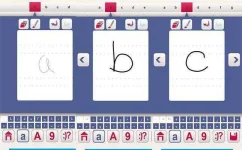
What does this font maker app do?
What this app does is let you literally draw out your own font. You can use your finger or, in the pro version, S-Pen to create a custom made font. It’s very simple to use. Once you open the app, it’ll take you to a screen with letters on it. You click on the “A” and then you draw an “A”, continue to “B”, and so forth. When you’re done, you have a custom made font that can be used in a number of scenarios. In the free version, you can use it to send messages, emails, status updates on various social media platforms, and other basic text actions.
If you pick up the Pro version, things get a little more interesting. You can create multiple fonts and even export fonts to be installed and used on PC and Mac. Unfortunately, there’s no way to make your font the system font on Android. It usually requires root access to make such a change and we would’ve loved to have seen an option to export for Android, but not doing so doesn’t ruin the experience.
There are a variety of other uses for such an app. The developers cite the ability to keep your child’s handwriting forever or creating a secret code for you and your friends. You can’t do some of the more complicated stuff, but who wouldn’t like a Tolkien Elvish font to send to your closest nerd friends?
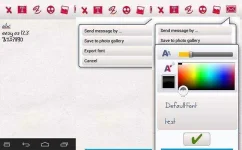
What do we think of this app?
It’s simple and fun. As long as you don’t take the app too seriously, there shouldn’t be any problems enjoying it. The upside is you get to make your own font and use it in a number of applications. If you pay for it, you can have it on your computer permanently. The downside is you can’t use it as a system font. We’re not going to tell you it’s the world’s most exciting app, because it isn’t. It is fun to use, though. Especially if you’re into creating your own type. We recommend trying out the Lite version to see if you like it first.
Code:
MyReaFont  apk

Current Version : 1.1.13
Requires Android : 2.2 and up
Category : Social
Size : 9.8M

MyReaFont Pro apk Review


TURN YOUR HAND WRITING INTO A FONT
*** Upgrade to PRO and get : Unlimited fonts , Export Font, Ads free ****

****MyRealFont is recommended and supported bu SAMSUNG as one of the best apps for Samsung devices****

*** Create your real handwriting font and start writing personal messages on your Android device***

*** Export your hand written font and use it on your PC or MAC***

*** Share your Text on Instagram ****
*** Post in on Facebook and get high exposure post***
*** Post on Google + ***

*** Create personal messages and postcards using your own photos or our extensive library of design backgrounds ***

*** Share your personal messages by Mail, Facebook, Twitter, Text , or any chat apps such as Line, Skype, ChatOn,WhatsApp and more***

*** Save your kids handwriting for ever, see how their handwriting is changed as they grow! ****

*** Create Secret codes and send to your lover and friends ***

Enjoy all these features and much more!!!

THIS 1.1.13ON IS RECOMMENDED TO ALL DEVICES
Download Via Mediafire : You do not have permission to view the full content of this post. Log in or register now.
Password : phcorner

