PH
PHjosemar142002
Journeyman
Download Mode / Odin Mode
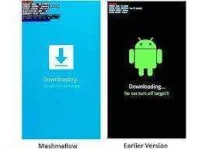
- Odin mode, also known as Download mode, is a mode for SAMSUNG only. It is a state that allows you to flash firmware through Odin or other desktop software. When in Downloadmode, you will see s triangle with an Androidimage in it and says "Downloading..."
"Ito yung mode na ginagamit kung ikaw ay mag flash ng stock rom or twrp using ODIN on pc."
Ang ODIN MODE ito ay makikita lamang sa SAMSUNG PHONES wala nang iba.
Ang gamit nito ay magreceive ng updates ng bagong software sa phone mo o i reprogram ang phone mo kung my software defects man.
Note :
if you unplug your device or remove the battery of your device when you are flashingfirmware while in download mode, your phone probably won't turn on anymore and be bricked.
So dapat ayusin natin ang paggamit nito, dapat may eksaktong materyales tayong gagamitin upang maiwasan natin ang lalaong pagkasira ng Phone .
- Odin mode, also known as Download mode, is a mode for SAMSUNG only. It is a state that allows you to flash firmware through Odin or other desktop software. When in Downloadmode, you will see s triangle with an Androidimage in it and says "Downloading..."
"Ito yung mode na ginagamit kung ikaw ay mag flash ng stock rom or twrp using ODIN on pc."
Ang ODIN MODE ito ay makikita lamang sa SAMSUNG PHONES wala nang iba.
Ang gamit nito ay magreceive ng updates ng bagong software sa phone mo o i reprogram ang phone mo kung my software defects man.
Note :
if you unplug your device or remove the battery of your device when you are flashingfirmware while in download mode, your phone probably won't turn on anymore and be bricked.
So dapat ayusin natin ang paggamit nito, dapat may eksaktong materyales tayong gagamitin upang maiwasan natin ang lalaong pagkasira ng Phone .