PH
PHJohnFord TV
Forum Veteran
SERVER DOWN (WALA NG DROPLET)
OWN SERVER VALID UNTIL BUHAY ANG VPS
Donate Droplet for new server development
Credits: rh4d infonethub for info about shadowsocks
Umpisahan na natin for sun itong tutorial pero pwede din gamitin sa ibang networks
Step 1: Download nyo muna Shadowsocks for Android and Simple Obfuscation sa Playstore (Shadowsocks for PC and Obfuscation Plugin para sa PC/Laptop)
Step 2: Put these info sa shadowsocks
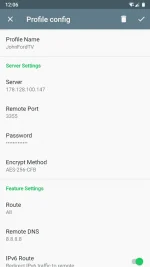
Step 3: Scroll down then configure simple obsfuscation
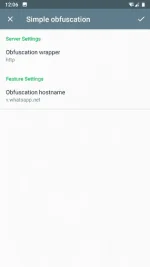
Sa Obfuscation Hostname lagay nyo payload na gamit nyo (in my case sun chatbased gamit ko for TU promo)
Final Step: Connect nyo na sabay takbo
*Droplet Donation will help pang release ng bagong server*
Extra:
*Para sa mga hindi alam ang ilalagay sa PC Version eto ilagay nyo settings*

Plugin Program: obfs-local (or obfs-local-x64 if 64bit version)
Plugin Options: obfs=http;obfs-host=lan.line.me (or other payloads)
Update: [Download Links]
PC Shadowsocks: You do not have permission to view the full content of this post. Log in or register now.
PC Obfs Plugin: You do not have permission to view the full content of this post. Log in or register now.
Android Shadowsocks: You do not have permission to view the full content of this post. Log in or register now.
Android Simple Obfuscation: You do not have permission to view the full content of this post. Log in or register now.
OWN SERVER VALID UNTIL BUHAY ANG VPS
Donate Droplet for new server development
Credits: rh4d infonethub for info about shadowsocks
Umpisahan na natin for sun itong tutorial pero pwede din gamitin sa ibang networks
Step 1: Download nyo muna Shadowsocks for Android and Simple Obfuscation sa Playstore (Shadowsocks for PC and Obfuscation Plugin para sa PC/Laptop)
Step 2: Put these info sa shadowsocks
Spoiler contents are visible only to Established Members.
Step 3: Scroll down then configure simple obsfuscation
Sa Obfuscation Hostname lagay nyo payload na gamit nyo (in my case sun chatbased gamit ko for TU promo)
Final Step: Connect nyo na sabay takbo
*Droplet Donation will help pang release ng bagong server*
Extra:
*Para sa mga hindi alam ang ilalagay sa PC Version eto ilagay nyo settings*
Plugin Program: obfs-local (or obfs-local-x64 if 64bit version)
Plugin Options: obfs=http;obfs-host=lan.line.me (or other payloads)
Update: [Download Links]
PC Shadowsocks: You do not have permission to view the full content of this post. Log in or register now.
PC Obfs Plugin: You do not have permission to view the full content of this post. Log in or register now.
Android Shadowsocks: You do not have permission to view the full content of this post. Log in or register now.
Android Simple Obfuscation: You do not have permission to view the full content of this post. Log in or register now.