 PH
PHclick Start>Right-Click My Computer>Manage.

Device Manager>View>Show Hidden Devices.

Network Adapters>Right-Click Anchorfree HSS Adapter>Properties.

Advanced Tab>Mac Address.
Open Command Prompt type: ipconfig /all
Find the Physical Address of Anchorfree HSS Adapter Then Change The Last Digit to 0,1,2,3,4,5,6,7,8,9 or A,B,C,D,E,F


AFTER
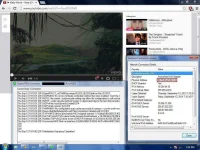
Credits to bossing rico4103.
Device Manager>View>Show Hidden Devices.
Network Adapters>Right-Click Anchorfree HSS Adapter>Properties.
Advanced Tab>Mac Address.
Open Command Prompt type: ipconfig /all
Find the Physical Address of Anchorfree HSS Adapter Then Change The Last Digit to 0,1,2,3,4,5,6,7,8,9 or A,B,C,D,E,F
AFTER
Credits to bossing rico4103.


