 PH
PHIt feels upset if in the crucial minutes of the game there is even a Notification WhatsApp or LINE Messenger appears on the screen. It's really annoying, and can make a wrong focus. For notifications no longer bother you while playing Mobile Legends, follow these steps:
=> Open the Settings menu on your Android smartphone. Then go to Sound & Notification menu or other similar menu, it can be Notification or Notification & Status Bar.
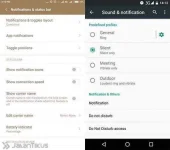
=> In the Notification menu, select App Notifications.

Note: [/ note] At least your smartphone is already using Android Marshmallow to find this feature.
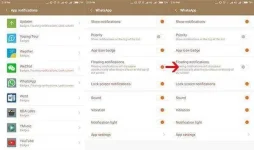
=> Please find out what application you want to stop the notification. If it's often annoyed by the WhatsApp notification, then select the WhatsApp app, and turn off the Floating Notifications feature in the app.
Easy really right? Next you can play Mobile Legends games seriously without having to worry about notifications that appear suddenly on the screen again.
Good luck!
=> Open the Settings menu on your Android smartphone. Then go to Sound & Notification menu or other similar menu, it can be Notification or Notification & Status Bar.
=> In the Notification menu, select App Notifications.
Note: [/ note] At least your smartphone is already using Android Marshmallow to find this feature.
=> Please find out what application you want to stop the notification. If it's often annoyed by the WhatsApp notification, then select the WhatsApp app, and turn off the Floating Notifications feature in the app.
Easy really right? Next you can play Mobile Legends games seriously without having to worry about notifications that appear suddenly on the screen again.
Good luck!
