 PH
PHPadrePatatas
Enthusiast
Source: You do not have permission to view the full content of this post.
Log in or register now.
Share ko lang sa mga hindi pa nakakaalam. May emoji panel na sa windows 10 para mas madaling gamitin kung mahilig kayo sa emoji.
How to:
1) Kelangan nyo lang ng updated na Windows 10.
2) Press Windows logo key + “.” or “;”
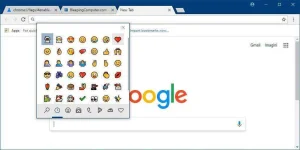
Now, you can use Emoji Panel to insert multiple emoji at once. After opening up the panel by pressing hotkey Windows logo key + “.” or “;”, you can browse, search and then select more than one emoji. The panel won’t go away until you click close button or press the “Esc” key. More emoji will also now appear as you’re typing related words with the touch keyboard.
Share ko lang sa mga hindi pa nakakaalam. May emoji panel na sa windows 10 para mas madaling gamitin kung mahilig kayo sa emoji.
How to:
1) Kelangan nyo lang ng updated na Windows 10.
2) Press Windows logo key + “.” or “;”
