🔒 Closed Signature inforcement

Status
Not open for further replies.

ralph.. 11

Fanatic
the laptop is Hp 2000 netbook pc.. Windows 8
gusto ko sana mag install ng drivers...
pero need tangalin yung signature inforcement..
nag try na ako sa settings.. at sa
start up.. pero wala ang trouble shoot..

any solution??
im planning to install new windows.. like 7,8,10
pwd kaya ito?? pero wla din ako windows key..

help pls.. any solution.. hindi din kasi maformat..
 

Attachments

  • IMG_20181109_083313.jpg
    IMG_20181109_083313.jpg
    79.6 KB · Views: 0
Type mo sa CMD As Administrator.

Code:
bcdedit /set testsigning on

Kapag tapos ka na sa pag-install ng drivers, disable by using this.

Code:
bcdedit /set testsigning off

Or if hindi siya gumana, try this one instead.

Hold Shift Key and Click Restart.
At meron lalabas na secret menu diyan. So what you gonna do is, go-to

Troubleshoot - Advanced Option - and Click Startup Settings and Click Restart.

Now kapag meron lumabas na option, press F7 or 7 para madisable niya.

I hope this help.
 
thanks.. but not working.. wala po kasi troubleshooting sa startup...
usb,windows 8,at shutdown..
516830d2ce395f6213000001.webp
source: You do not have permission to view the full content of this post. Log in or register now.
Type mo sa CMD As Administrator.

Code:
bcdedit /set testsigning on

Kapag tapos ka na sa pag-install ng drivers, disable by using this.

Code:
bcdedit /set testsigning off

Or if hindi siya gumana, try this one instead.

Hold Shift Key and Click Restart.
At meron lalabas na secret menu diyan. So what you gonna do is, go-to

Troubleshoot - Advanced Option - and Click Startup Settings and Click Restart.

Now kapag meron lumabas na option, press F7 or 7 para madisable niya.

I hope this help.
 
Type mo sa CMD As Administrator.

Code:
bcdedit /set testsigning on

Kapag tapos ka na sa pag-install ng drivers, disable by using this.

Code:
bcdedit /set testsigning off

Or if hindi siya gumana, try this one instead.

Hold Shift Key and Click Restart.
At meron lalabas na secret menu diyan. So what you gonna do is, go-to

Troubleshoot - Advanced Option - and Click Startup Settings and Click Restart.

Now kapag meron lumabas na option, press F7 or 7 para madisable niya.

I hope this help.
i tried yung.. sa cmd.. nag success. sya.. pero.. same.. ayaw parin mag install nung driver...

at yung sa startup..
hindi ko alam kung bakit wala sya troubleshooting
 
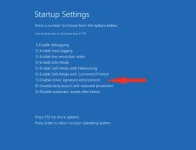
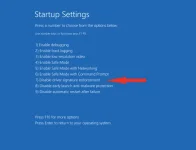
Pagka-on mo ng laptop tadtarin mo ung f8 tapos may lalabas dung mga options (See image) then piliin mo ung Disable driver signature enforcement then pagkaboot mo charaaan pede na... Note !!! Di permanent ung setting na disable driver signature enforcement gagana lang un kung kelan mo i-on ung netbook for example 3 boots 1 boot disable driver signature enforcement then install drivers 2 boot and 3rd boot kelangan mo ulit if8 at i-disable ang Driver enforcement kung magiinstall ka ng mga ibang drivers na unsigned :)
 

Attachments

  • maxresdefault.jpg
    maxresdefault.jpg
    49.4 KB · Views: 0
Status
Not open for further replies.

About this Thread

  • 8
    Replies
  • 284
    Views
  • 4
    Participants
Last reply from:
untouched_nnnnn

Trending Topics

Online now

Members online
1,026
Guests online
1,594
Total visitors
2,620

Forum statistics

Threads
2,275,274
Posts
28,961,953
Members
1,232,686
Latest member
cxxxlll
Back
Top