 PH
PHartichoke211
Eternal Poster
REquirements:
Http Injector
usb data cable
and Pc
brain na rin
Follow na lng da Pic
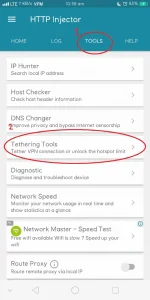
1. Punta kayo sa "TOOLS", then press tethering tools
2. Press Start Hotshare at i-connect mo iyong phone mo sa PC dapat naka enable na ang USB tethering sa setting ng phone niyo !
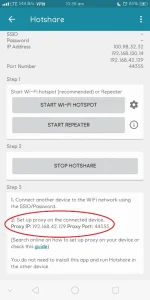
3. Pagkatapos!, Copy niyo iyong Proxy IP at Port (EX.192.168.42.129:44355)
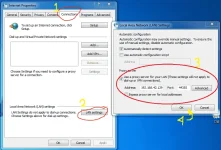
a.Punta kayo sa PC niyo at Open "INTERNET PROPERTIES"
b.FOLLOW NIYO ung step sa image
Http Injector
usb data cable
and Pc
brain na rin
Follow na lng da Pic
1. Punta kayo sa "TOOLS", then press tethering tools
2. Press Start Hotshare at i-connect mo iyong phone mo sa PC dapat naka enable na ang USB tethering sa setting ng phone niyo !
3. Pagkatapos!, Copy niyo iyong Proxy IP at Port (EX.192.168.42.129:44355)
a.Punta kayo sa PC niyo at Open "INTERNET PROPERTIES"
b.FOLLOW NIYO ung step sa image
 pag phone naman, FB lang nababrowse