 PH
PHSimpleng tutorial lang mga ka-ph. if you want to record your screen no need to DL some software (It's up to you if you want to DL some software feel free to do it) So ito na nga hehehe, Kung mayroon kayong latest na Microsoft PowerPoint ok yan. Ako gamit kong powerpoint is 2016.
PowerPoint
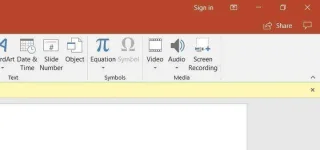
Here’s how to do it, mga ka-ph step-by-step:
Step 1: Head to the “Insert” tab, and select “Screen Recording.” see picture
Step 2: Click “Select Area” to choose the specific area of your screen you want to record. You can see a red broken line, adjust it the way you want to record hehe. If you want to record the entire screen, press the Windows Key, Shift and “F.”
There is a pop up tab button which you can record, the time, the selection area audio, and the record pointer. this tab button is auto-hide feature to show it again just move the pointer of the mouse at the top
Step 3: Click the “record” button,” or press the Windows key, Shift and “R.”
When you’re done you can save the video as a separate file to access or embed as you see fit. Editing and control options are very limited after that, but it’s a great option for quick-and-dirty recording — especially if you’re doing it for a looming presentation. And don’t ignore the video enhancement tools that PowerPoint offers, such as changing the video’s shape, adding a border, and adding effects like shadows, glow, and more.
So yun hahaha, hope it helps this tutorial. Para di na makadagdag ng memory sa pc, hahaha tipid tips
Special thanks to: Digital trends.com, Techradar for the good source of it.
you can also DL some top and most used Screen recorder
You do not have permission to view the full content of this post. Log in or register now.
You do not have permission to view the full content of this post. Log in or register now.
You do not have permission to view the full content of this post. Log in or register now.
PowerPoint
Here’s how to do it, mga ka-ph step-by-step:
Step 1: Head to the “Insert” tab, and select “Screen Recording.” see picture
Step 2: Click “Select Area” to choose the specific area of your screen you want to record. You can see a red broken line, adjust it the way you want to record hehe. If you want to record the entire screen, press the Windows Key, Shift and “F.”
There is a pop up tab button which you can record, the time, the selection area audio, and the record pointer. this tab button is auto-hide feature to show it again just move the pointer of the mouse at the top
Step 3: Click the “record” button,” or press the Windows key, Shift and “R.”
When you’re done you can save the video as a separate file to access or embed as you see fit. Editing and control options are very limited after that, but it’s a great option for quick-and-dirty recording — especially if you’re doing it for a looming presentation. And don’t ignore the video enhancement tools that PowerPoint offers, such as changing the video’s shape, adding a border, and adding effects like shadows, glow, and more.
So yun hahaha, hope it helps this tutorial. Para di na makadagdag ng memory sa pc, hahaha tipid tips
Special thanks to: Digital trends.com, Techradar for the good source of it.
you can also DL some top and most used Screen recorder
You do not have permission to view the full content of this post. Log in or register now.
You do not have permission to view the full content of this post. Log in or register now.
You do not have permission to view the full content of this post. Log in or register now.