 PH
PHAlfredTheGreat
Eternal Poster
*** THIS APP IS FOR ROOTED DEVICES ONLY ***
One of the more annoying things about the Android app ecosystem is that there are loads of apps and games that are needlessly restricted to one device or another. If you care to get down and dirty, you can edit the build.prop file on rooted devices to make your device appear to be something other than what it is. Market Helper gets you the same results, but it doesn't touch the build-prop and it's easy to revert to your original profile. For obvious reasons, this app is not in Google Play. It is, however, just a sideload away.
How to use?
Open the app. Select the device and carrier you want to change to
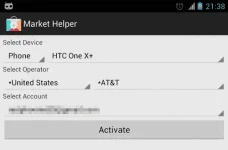
Press Activate. Wait until it’s done
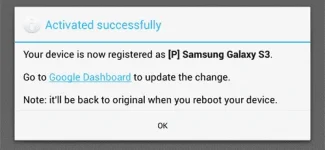
IMPORTANT: go to You do not have permission to view the full content of this post. Log in or register now. to update the change ( just visit the page, you don’t need to do anything ).
If you want to switch back to normal, select “Restore” in device list and press “Activate”, or simply reboot the device ( with wifi/data is enabled)
Download: You do not have permission to view the full content of this post. Log in or register now.
One of the more annoying things about the Android app ecosystem is that there are loads of apps and games that are needlessly restricted to one device or another. If you care to get down and dirty, you can edit the build.prop file on rooted devices to make your device appear to be something other than what it is. Market Helper gets you the same results, but it doesn't touch the build-prop and it's easy to revert to your original profile. For obvious reasons, this app is not in Google Play. It is, however, just a sideload away.
How to use?
Open the app. Select the device and carrier you want to change to
Press Activate. Wait until it’s done
IMPORTANT: go to You do not have permission to view the full content of this post. Log in or register now. to update the change ( just visit the page, you don’t need to do anything ).
If you want to switch back to normal, select “Restore” in device list and press “Activate”, or simply reboot the device ( with wifi/data is enabled)
Download: You do not have permission to view the full content of this post. Log in or register now.