🔒 Closed Pc all system app not working

Status
Not open for further replies.

The Dongs One

Honorary Poster
Patulong po.huhu. Hindi kasi nag oopen lahat ng system apps ko. Nagsimula po ito nung nag update ako ng app sa windows store after ma update pag open ko sa app na yun ay hindi na naoopen lahat ng system app ko.sana matulungan niyo po ako kasi ginagamit ko kasi ito sa School. Maraming salamat po sa mga tutulong.
 
Start > Power Menu > While holding down the Shift key on your keyboard, click Restart.
upload_2018-9-27_19-29-52.png

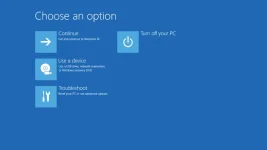
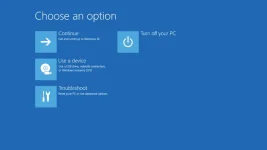
You will be presented with this menu.
tartup-options-windows-10-56a6fad85f9b58b7d0e5d1a3.webp

go to Troubleshoot.
resetare-pc-windows-10.webp

You can either Reset or Refresh. Reset is pretty much formatting your hard drive. Deletes all your files and re-installs Windows.
Refresh does the same BUT, leaves your files untouched such as apps installed.
 
Yun na
Start > Power Menu > While holding down the Shift key on your keyboard, click Restart.
View attachment 462891

You will be presented with this menu.
tartup-options-windows-10-56a6fad85f9b58b7d0e5d1a3.webp

go to Troubleshoot.
resetare-pc-windows-10.webp

You can either Reset or Refresh. Reset is pretty much formatting your hard drive. Deletes all your files and re-installs Windows.
Refresh does the same BUT, leaves your files untouched such as apps installed.

Mag reinstall na lang po ata ako ng windows.
Pero wala po akong file ng Windows po.
 
Status
Not open for further replies.

Similar threads

About this Thread

  • 21
    Replies
  • 722
    Views
  • 8
    Participants
Last reply from:
The Dongs One

Trending Topics

Online now

Members online
895
Guests online
721
Total visitors
1,616

Forum statistics

Threads
2,275,563
Posts
28,964,107
Members
1,231,866
Latest member
terrorspeed
Back
Top