 PH
PHAnna Kushina
Eternal Poster

ABOUT
Join millions of creative folks who trust and use Adobe Photoshop E×ρréšš, one of the best photo editor and collage maker on Android for quick, easy and powerful editing on mobile devices.
PHOTO EDITOR
- Basics: Crop, straighten, rotate, and flip your photos. Remove red eye and pet eye.
- Auto-Fix: A one-touch adjustment for contrast, exposure, and white balance.
- Blemish removal: With user, friendly one touch, remove spots, dirt, and dust from your photos.
- Corrections: Instantly light up your selfie or photo with slide controls for clarity, contrast, exposure, highlights, shadows, blacks, whites, temperature, tint, sharpen, saturation and vibrance.
- Filters or Looks: A new smart way to turn any photo into artwork - choose from over 80+ preset eye-catching fun styles. You can control intensity of your looks for realistic photo effects.
- Watermark images: Easily add custom text or graphical watermark on images.
- Customization: Create and save your own Looks.
- Photo Frames: Add a distinctive personal touch to your photos with over 15 borders and frames. For a harmonious look, match the border color with the colors in the image.
- Raw photo support: Import and edit photos in raw format.
- Share: Easily share to all your favourite social sites: Facebook, Twitter, Instagram, and more.
- Watermark images: Easily add custom text or graphical watermark on images.
- Image resize: Use this option to resize an image before saving.
- JPEG Quality output – Customize the quality and size of your output image.
COLLAGE MAKER
- Create a photo collage in seconds with our photo grid feature.
- Choose from a wide variety of grid layouts.
- Pick any photo in the layout, and edit it the way you like with the photo editor.
- Hold, drag and drop to swap photo position, pinch to zoom in or out, or drag the handles to resize.
- Add new image or replace by simple selection.
- Adjust/fix a single image and apply any look.
- Change border thickness and color.
- Print directly from the application
AWESOME FEATURES
- One-touch Filters or Looks: Get additional filters for fun, fresh looks!
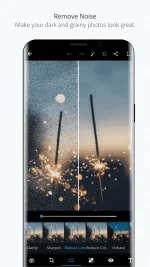
- Noise Reduction: Minimize unwanted grain and speckling in night photos and low light photos.
- Defog: Reduce fog and haze in photos.
- Perspective Correction – Fix the skewed perspective photos with just a click! Choose from auto (balanced or full auto), vertical, or horizontal correction options.- Access Premium Features when you sign in with an Adobe ID:
- Access these features when you sign in with an Adobe ID
Once you’re done with the photo editor or collage maker, share your finished work directly to Instagram, Facebook, Twitter, WhatsApp, or your other favorite social networks!
Want to do more with your photos? Have a look at these other free Adobe Photoshop mobile apps:
- Photoshop Mix — Cut out and combine elements from different images, blend layers, and apply looks on your iPad or iPhone — anywhere you are.
- Photoshop Fix — Edit facial features, heal, lighten, liquefy, color and adjust your images to perfection — and then easily share them across other Creative Cloud desktop and mobile apps.
- Lightroom Mobile – Capture, edit, organize and share professional quality images from your smartphone or tablet.
Photoshop E×ρréšš supports the following file formats:
- Photo: JPG, PNG
- Raw files: arw (SONY), cr2 (CANON), crw (CANON), dng, erf (EPSON), raf (FUJI), 3fr & fff (HASSELBLAD), dcr (KODAK), mrw (KONICA), mos (LEAF), rwl (LEICA), nef & nrw (NIKON), orf (OLYMPUS), rw2 (PANASONIC), pef (PENTAX), srw (SAMSUNG)
- While we aim to provide support for raw files from the latest camera models of most camera manufacturers, we cannot guarantee universal raw support.
Photoshop E×ρréšš, brought to you by Adobe the proud makers of the Photoshop family of products, has the power of Photoshop CC which gives you the flexibility and control to access your images anywhere using Adobe Creative Cloud.
IMAGES



DOWNLOAD
>> ARM

>> x86

..enjoy
