PH
PHitsadengcxz
Leecher
Anyone? Who knows how to fix iCloud issue? Nakalimutan kopo kasi yung apple id eh. Heeeelp! May tutulong ba sakin?
Hindi na po ba to maayos?Pyesa na Lang yan
Un lang alam ko wala pa bypass nian eh
Hindi na po ba to maayos?Un lang alam ko wala pa bypass nian eh
Alam ko tlga wla p bypass jan maliban n lng kung alam mo tlga icloud moHindi na po ba to maayos?
Wala talaga ehAlam ko tlga wla p bypass jan maliban n lng kung alam mo tlga icloud mo
Not for sale poBuy ko nalang yan pm sira lcd ko e pm me
Buy ko nalang yan pm sira lcd ko e pm me
Yes po.Stucked po ba sa Activation screen?
Naku! Wala na. Finish na. Pag ganyang d alam ang iCloud password, d po dapat yan nirereset.Yes po.
Hindi po afford ehisa lang solusyon jan palitan m logic board na walang icloud account
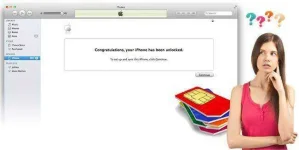


Wala po kaming computer huhu anyways thanl you po.4 Ways to Bypass iCloud Lock for Your iPhone
There are some valid reasons why an iPhone might be locked out of its associated iCloud account. If it is locked, the phone becomes practically unusable. We have the You do not have permission to view the full content of this post. Log in or register now. tools, and want to help.
If you have had a problem, problem solved!
Solution One – Bypass iCloud Activation Lock Software - iCL0udin
- You do not have permission to view the full content of this post. Log in or register now.
- You do not have permission to view the full content of this post. Log in or register now.
- You do not have permission to view the full content of this post. Log in or register now.
- You do not have permission to view the full content of this post. Log in or register now.
iCL0udin is another tool which can You do not have permission to view the full content of this post. Log in or register now. for your iPhone. This software has reasonably easy steps to follow which take a different route to the previous solution.
How to Bypass iCloud Lock on iPhone
Almost always, there is more than one way to do things.
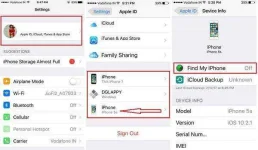
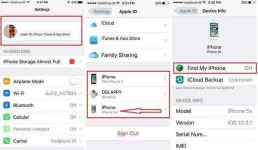
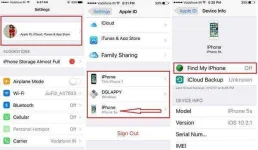
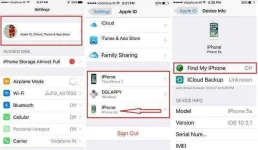
- Ensure that you have turned ‘Find my iPhone’ off.
- Download the ‘Bypass iCloud Activation Lock Tool’ to your computer by clicking You do not have permission to view the full content of this post. Log in or register now..
- Launch the program.
- Connect your iPhone to your PC with the help of USB cable and then You do not have permission to view the full content of this post. Log in or register now..
- Now, click on the ‘Start’ button.
- You will find a list of the modules and you should select the right model and then click on ‘Next’.
- Let the software work its way through the process.
- It may take 20 to 25 minutes. Once completed, your phone will reboot by itself.
- Make sure to reset your phone again as if it is new.
Solution Two – iCloud Activation Lock Removal Service
This solution is valid for all the following for OS: iPhones running iOS 10 or earlier and iPhone 2G, 3G, 3GS, 4, 4S, 5, 5C, 5S, 6, 6+, 6s, 6s+, 7, 7+, SE from most networks.
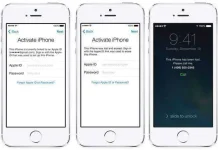
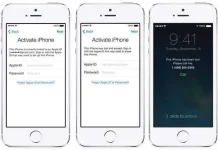
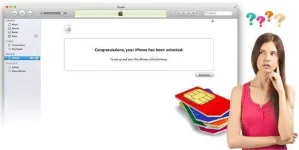
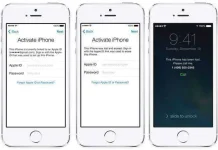
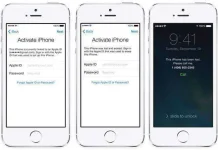
If your iPhone is stuck with any of the following screens, you might try this service. After the phone is unlocked, you can permanently remove the previous iCloud account on the iPhone and activate the iPhone with your new iCloud account. If you do have the Apple account email and just forgot the Apple ID or password, you can also try to You do not have permission to view the full content of this post. Log in or register now..
iCloud Activation Lock Removal from You do not have permission to view the full content of this post. Log in or register now. provides official Apple unlocks using iTunes which will not void the warranty. No jailbreak is required and after syncing the device with iTunes or iCloud, your iPhone/iPad remains unlocked. Now, let's follow the steps to bypass iCloud lock.
How to bypass iCloud lock
- Firstly, you need to go to the You do not have permission to view the full content of this post. Log in or register now. and select ‘iCloud Unlock’.
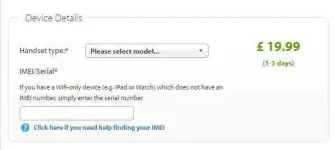
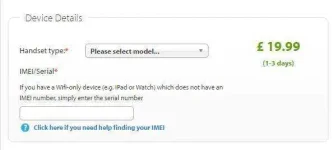
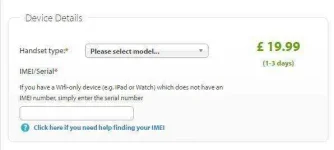
- Then you need to know your iPhone model type, then provide your IMEI. Note, the website offers you help in finding the IMEI, the unique identifier for each phone.
- Once you have entered the information, iCloud Lock Removal Service will mark your IMEI as unlocked within Apple's IMEI database. You do not need any more clever technical information or skills are required.
4 Ways to Bypass iCloud Lock for Your iPhone
There are some valid reasons why an iPhone might be locked out of its associated iCloud account. If it is locked, the phone becomes practically unusable. We have the You do not have permission to view the full content of this post. Log in or register now. tools, and want to help.
If you have had a problem, problem solved!
Solution One – Bypass iCloud Activation Lock Software - iCL0udin
- You do not have permission to view the full content of this post. Log in or register now.
- You do not have permission to view the full content of this post. Log in or register now.
- You do not have permission to view the full content of this post. Log in or register now.
- You do not have permission to view the full content of this post. Log in or register now.
iCL0udin is another tool which can You do not have permission to view the full content of this post. Log in or register now. for your iPhone. This software has reasonably easy steps to follow which take a different route to the previous solution.
How to Bypass iCloud Lock on iPhone
Almost always, there is more than one way to do things.
- Ensure that you have turned ‘Find my iPhone’ off.
- Download the ‘Bypass iCloud Activation Lock Tool’ to your computer by clicking You do not have permission to view the full content of this post. Log in or register now..
- Launch the program.
- Connect your iPhone to your PC with the help of USB cable and then You do not have permission to view the full content of this post. Log in or register now..
- Now, click on the ‘Start’ button.
- You will find a list of the modules and you should select the right model and then click on ‘Next’.
- Let the software work its way through the process.
- It may take 20 to 25 minutes. Once completed, your phone will reboot by itself.
- Make sure to reset your phone again as if it is new.
Solution Two – iCloud Activation Lock Removal Service
This solution is valid for all the following for OS: iPhones running iOS 10 or earlier and iPhone 2G, 3G, 3GS, 4, 4S, 5, 5C, 5S, 6, 6+, 6s, 6s+, 7, 7+, SE from most networks.
If your iPhone is stuck with any of the following screens, you might try this service. After the phone is unlocked, you can permanently remove the previous iCloud account on the iPhone and activate the iPhone with your new iCloud account. If you do have the Apple account email and just forgot the Apple ID or password, you can also try to You do not have permission to view the full content of this post. Log in or register now..
iCloud Activation Lock Removal from You do not have permission to view the full content of this post. Log in or register now. provides official Apple unlocks using iTunes which will not void the warranty. No jailbreak is required and after syncing the device with iTunes or iCloud, your iPhone/iPad remains unlocked. Now, let's follow the steps to bypass iCloud lock.
How to bypass iCloud lock
- Firstly, you need to go to the You do not have permission to view the full content of this post. Log in or register now. and select ‘iCloud Unlock’.
- Then you need to know your iPhone model type, then provide your IMEI. Note, the website offers you help in finding the IMEI, the unique identifier for each phone.
- Once you have entered the information, iCloud Lock Removal Service will mark your IMEI as unlocked within Apple's IMEI database. You do not need any more clever technical information or skills are required.
sino naka try nito?may bayad ba yung official iphone unlock website??4 Ways to Bypass iCloud Lock for Your iPhone
There are some valid reasons why an iPhone might be locked out of its associated iCloud account. If it is locked, the phone becomes practically unusable. We have the You do not have permission to view the full content of this post. Log in or register now. tools, and want to help.
If you have had a problem, problem solved!
Solution One – Bypass iCloud Activation Lock Software - iCL0udin
- You do not have permission to view the full content of this post. Log in or register now.
- You do not have permission to view the full content of this post. Log in or register now.
- You do not have permission to view the full content of this post. Log in or register now.
- You do not have permission to view the full content of this post. Log in or register now.
iCL0udin is another tool which can You do not have permission to view the full content of this post. Log in or register now. for your iPhone. This software has reasonably easy steps to follow which take a different route to the previous solution.
How to Bypass iCloud Lock on iPhone
Almost always, there is more than one way to do things.
- Ensure that you have turned ‘Find my iPhone’ off.
- Download the ‘Bypass iCloud Activation Lock Tool’ to your computer by clicking You do not have permission to view the full content of this post. Log in or register now..
- Launch the program.
- Connect your iPhone to your PC with the help of USB cable and then You do not have permission to view the full content of this post. Log in or register now..
- Now, click on the ‘Start’ button.
- You will find a list of the modules and you should select the right model and then click on ‘Next’.
- Let the software work its way through the process.
- It may take 20 to 25 minutes. Once completed, your phone will reboot by itself.
- Make sure to reset your phone again as if it is new.
Solution Two – iCloud Activation Lock Removal Service
This solution is valid for all the following for OS: iPhones running iOS 10 or earlier and iPhone 2G, 3G, 3GS, 4, 4S, 5, 5C, 5S, 6, 6+, 6s, 6s+, 7, 7+, SE from most networks.
If your iPhone is stuck with any of the following screens, you might try this service. After the phone is unlocked, you can permanently remove the previous iCloud account on the iPhone and activate the iPhone with your new iCloud account. If you do have the Apple account email and just forgot the Apple ID or password, you can also try to You do not have permission to view the full content of this post. Log in or register now..
iCloud Activation Lock Removal from You do not have permission to view the full content of this post. Log in or register now. provides official Apple unlocks using iTunes which will not void the warranty. No jailbreak is required and after syncing the device with iTunes or iCloud, your iPhone/iPad remains unlocked. Now, let's follow the steps to bypass iCloud lock.
How to bypass iCloud lock
- Firstly, you need to go to the You do not have permission to view the full content of this post. Log in or register now. and select ‘iCloud Unlock’.
- Then you need to know your iPhone model type, then provide your IMEI. Note, the website offers you help in finding the IMEI, the unique identifier for each phone.
may bayad ba tu??
- Once you have entered the information, iCloud Lock Removal Service will mark your IMEI as unlocked within Apple's IMEI database. You do not need any more clever technical information or skills are required.