 PH
PHWelcome I'll share this helpful tips
tnx to: You do not have permission to view the full content of this post. Log in or register now.
- Click on the start button, then right click on Computer and select Manage.
- Click on Device Manager on the side menu.
- Expand Disk drives and locate your external drive from the list.
- Right click on the drive and select Properties.
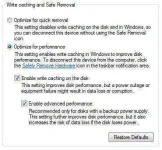
- On the Policies tab, select Optimize for performance.
- Next, check Enable write caching on the disk and Enable advanced performance as shown below.
- Hit OK and reboot.
tnx to: You do not have permission to view the full content of this post. Log in or register now.