 PH
PHHere's how to download apps na galing/directly from playstore in your web browser.
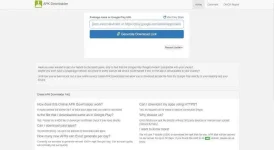
3. Open google playstore in your web browser.

4. Select app na gusto mo then copy url.

5. Paste URL sa AppsEvozi.

6. Click Generate download Link (Wait for it to fetch data/apk.)
7. Then click download (Green button.)
There you go. Enjoy !
- Open your web browser, eg : Chrome, Firefox
- Type in URL box : apps.evozi.com choose APK downloader or simply search apps evozi sa net.
3. Open google playstore in your web browser.
4. Select app na gusto mo then copy url.
5. Paste URL sa AppsEvozi.
6. Click Generate download Link (Wait for it to fetch data/apk.)
7. Then click download (Green button.)
There you go. Enjoy !

