 PH
PHGood day phc, today I will share to you the trick in OpenVPN for your Sun Cellular TU Promo. Let's start.
Steps:
1.Download and install OpenVPN (latest)
Link: You do not have permission to view the full content of this post. Log in or register now.
2. Register to any account here:
Link: You do not have permission to view the full content of this post. Log in or register now.
*be sure you download the specific .ovpn on the respective account you created.
*tip: much stable in port 443 support than 80.
3. Open the .ovpn you download and insert this line after ..verb 3
3.1 For auto log-in credentials change line:
4. Now save then import using the app. Hit connect. Enjoy!
Proof:
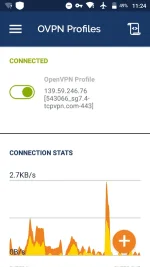
* this method is 100% working in TU150 promo. Try if working on other TU promo.
Sun TU promo validity
TU20- 3 days
TU50- 10 days
TU150- 30 days
*NO BLOCKING BUT WITH CAPPING
4GB/DAY
Keep it safe, keep it low
GUILTY
Steps:
1.Download and install OpenVPN (latest)
Link: You do not have permission to view the full content of this post. Log in or register now.
2. Register to any account here:
Link: You do not have permission to view the full content of this post. Log in or register now.
*be sure you download the specific .ovpn on the respective account you created.
*tip: much stable in port 443 support than 80.
3. Open the .ovpn you download and insert this line after ..verb 3
Spoiler contents are visible only to Established Members.
3.1 For auto log-in credentials change line:
Spoiler contents are visible only to Established Members.
4. Now save then import using the app. Hit connect. Enjoy!
Proof:
* this method is 100% working in TU150 promo. Try if working on other TU promo.
Sun TU promo validity
TU20- 3 days
TU50- 10 days
TU150- 30 days
*NO BLOCKING BUT WITH CAPPING
4GB/DAY
Keep it safe, keep it low
GUILTY
